What if we designed for curiosity instead of efficiency?
We measure products by how fast people get done. Some of the best experiences are the ones where you lose track of time for a good reason.
Most of the UX metrics I’ve worked with point the same way: time on task, steps to complete, drop-off rate. Fewer, faster, done. That’s right for paying a bill or booking a train. Nobody wants to explore their way through a checkout.
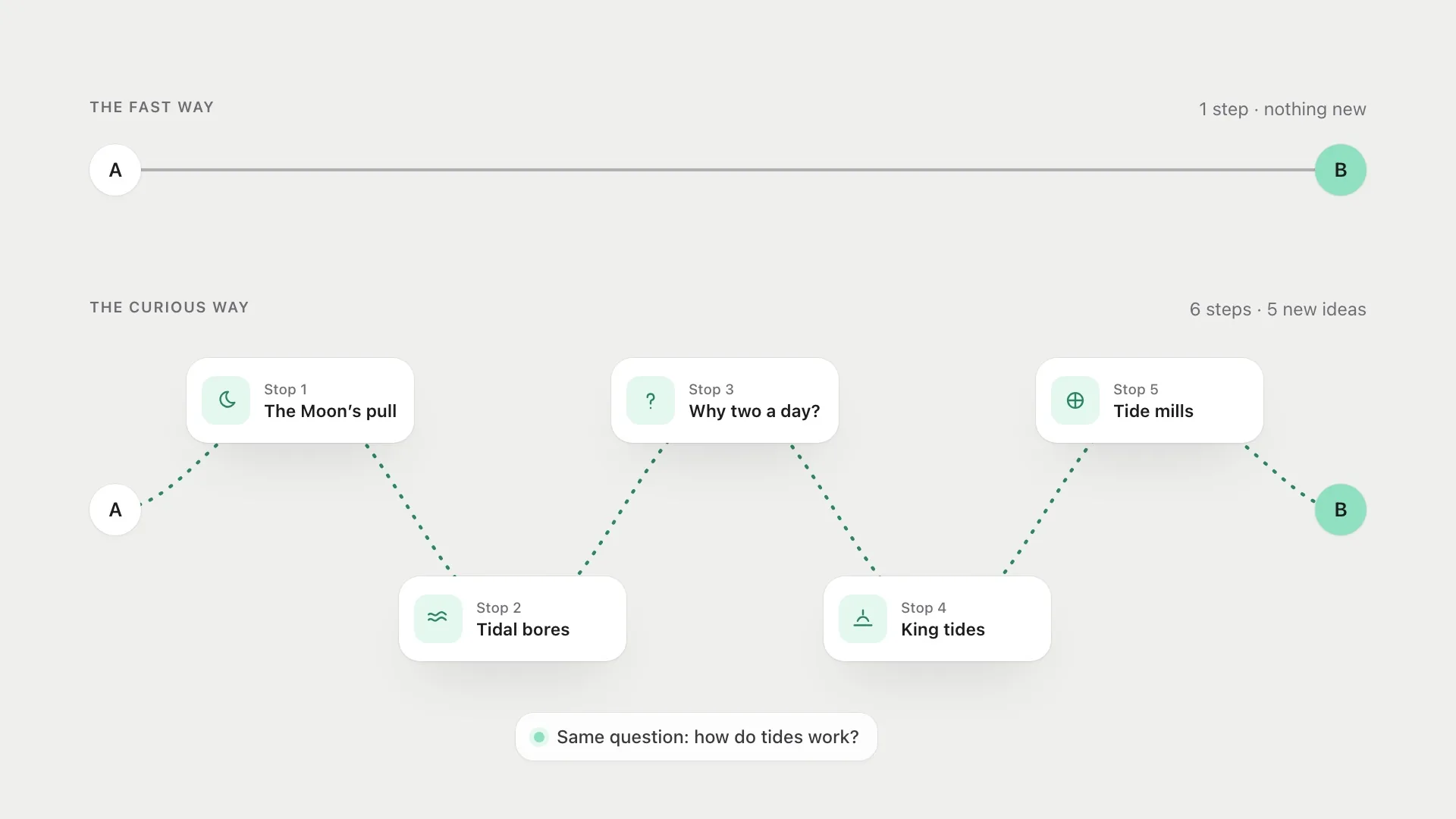
But not everything people do is a task. Reading about a topic you just discovered, wandering through a museum, following links late at night until you’re somewhere you never expected: these experiences are valuable precisely because they aren’t efficient. I’ve been wondering what a product would look like if curiosity, not completion, was the thing it was designed for.
What curiosity needs
The economist George Loewenstein described curiosity as a response to an information gap: we get curious when we know enough to notice that something is missing. Too little knowledge and there’s no gap to feel. Too much and the gap is closed. Curiosity lives in the middle.
That middle has been measured. Min Jeong Kang and colleagues showed people trivia questions and asked two things: how curious they were about the answer, and how likely they thought they were to know it. Curiosity traced an inverted U. It was lowest when people were sure they didn’t know and when they were sure they did, and highest in between. People were also willing to pay for it. When answers cost scarce tokens or waiting time, they spent more on the questions they were more curious about.
The useful word in Loewenstein’s account, for designers, is notice. A gap only produces curiosity if you can feel its edges. That means curiosity depends on what someone already knows, so the same screen can spark it in one person and leave another cold. It also means you can’t create curiosity by withholding things at random. A blank is not a gap. A gap is a specific missing piece in a picture you can mostly see.
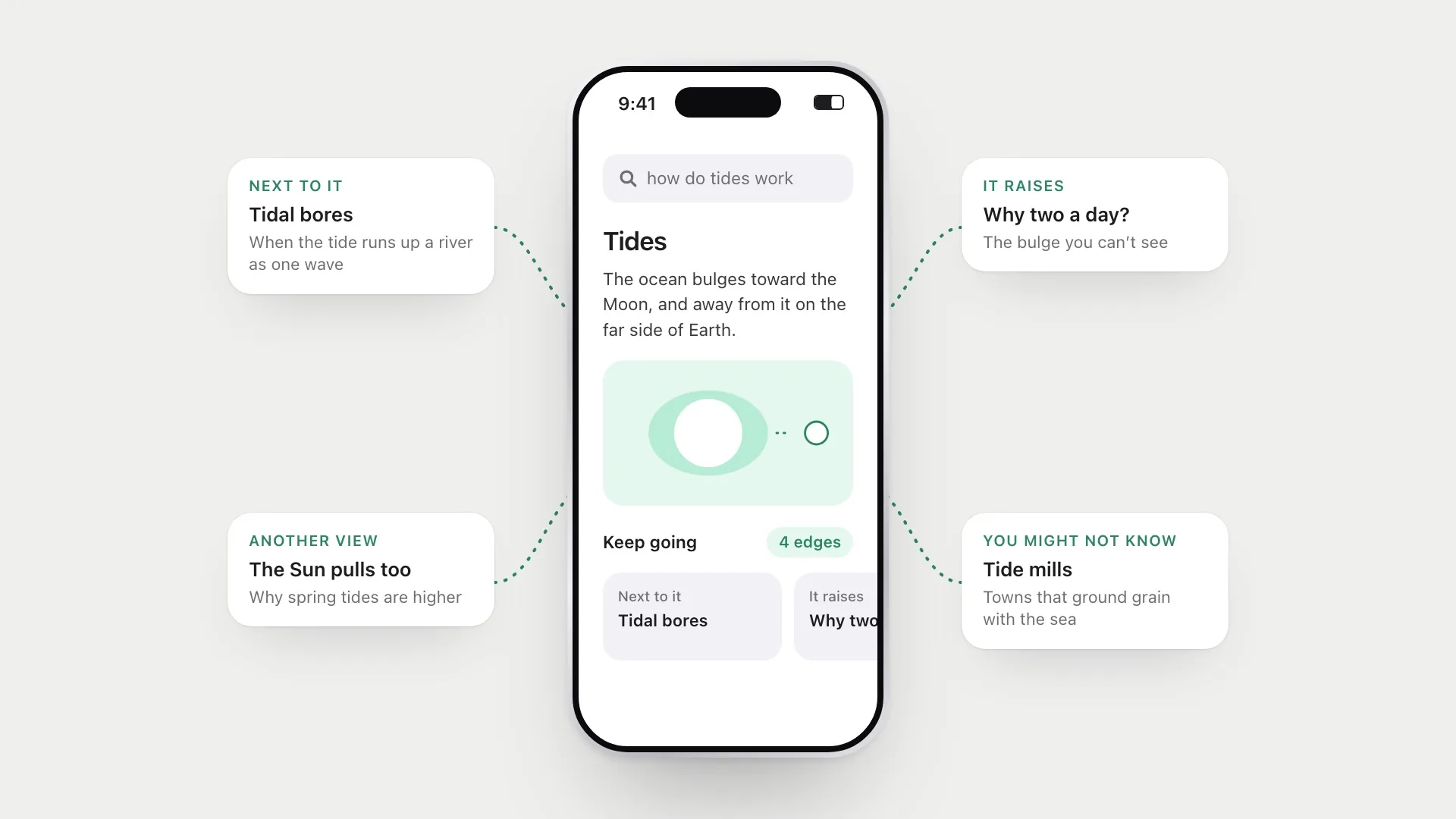
Most interfaces close gaps as fast as possible. A search box gives you the answer and the session ends. A curious interface would sometimes do the opposite: give you a partial picture and an inviting edge to keep going.
Why it’s worth designing for
Curiosity isn’t only pleasant. It changes what people remember. In Kang’s study, higher curiosity was linked to better recall of answers that surprised people, tested one to two weeks later. Matthias Gruber, Bernard Gelman and Charan Ranganath found something stranger. While people waited for answers they were curious about, they were shown unrelated faces. They remembered those faces better too, as if curiosity opened a window in which the brain was more ready to keep things. Brain imaging linked this to the same dopamine-related reward circuits involved in anticipating other kinds of reward.
It’s tempting to stop there and conclude that a curious moment is a good place to put anything you want people to learn. I’d be careful. A later study by Nicole Keller and colleagues, with Gruber among the authors, tried the same trick with school-style facts instead of faces. This time, facts shown around high-curiosity questions were remembered worse. Strong curiosity seems to pull attention towards the thing you’re curious about, and more complex material nearby can lose out.
I find that tension useful rather than disappointing. It suggests curiosity is focused, not general. It boosts memory for the answer, and maybe for simple things in the background, but it doesn’t make people more receptive to whatever you put next to it. For design, that means the payoff of a gap should be the thing that matters. If the hook is interesting and the content it leads to is filler, people will remember the hook.
How people actually wander
There’s also research on what curious browsing looks like. David Lydon-Staley and colleagues followed 149 people as they explored Wikipedia freely for over five hours across 21 days, and mapped each person’s path as a network of concepts. They drew on a philosophical distinction between two styles: “hunters” who follow tight chains of closely related pages, and “busybodies” who jump between loosely connected topics. People who scored higher on deprivation curiosity, the itch to close a specific gap, built tighter networks and returned more often to concepts they’d already visited. Both are forms of curiosity. A good exploratory product would support both, rather than assuming everyone wants the most related next thing.
Philipp Singer and colleagues found a similar split at much larger scale. They surveyed almost 30,000 Wikipedia readers about why they were there and matched the answers to their browsing logs. People who were bored or exploring randomly made long, fast-paced sequences across topics. People reading for work or school spent longer on individual articles. Same site, very different ways of moving through it.
Peter Pirolli and Stuart Card’s information foraging theory explains why the shape of a link matters so much here. People move through information the way animals forage: they follow cues, which Pirolli and Card call information scent, that suggest something worthwhile lies in a direction, and they leave a patch when the expected gain drops. For a task, strong scent pointing straight at the answer is ideal. For curiosity, the scent has to point somewhere you didn’t already know you wanted to go, without being so vague you can’t judge whether it’s worth it.
Put those together and there’s a quiet problem with most recommendation design. “More like this” serves hunters well. It does almost nothing for busybodies, who need a doorway to something adjacent but different, and a reason to believe it’s worth opening.
Five ideas for a curious interface
Show the edges. Instead of only showing the answer, show what’s next to it: related ideas, opposing views, the question this answer raises. The edges are where exploration starts. Give them real scent: a specific question beats a generic “related articles” label, because it tells you what gap you’re about to close.
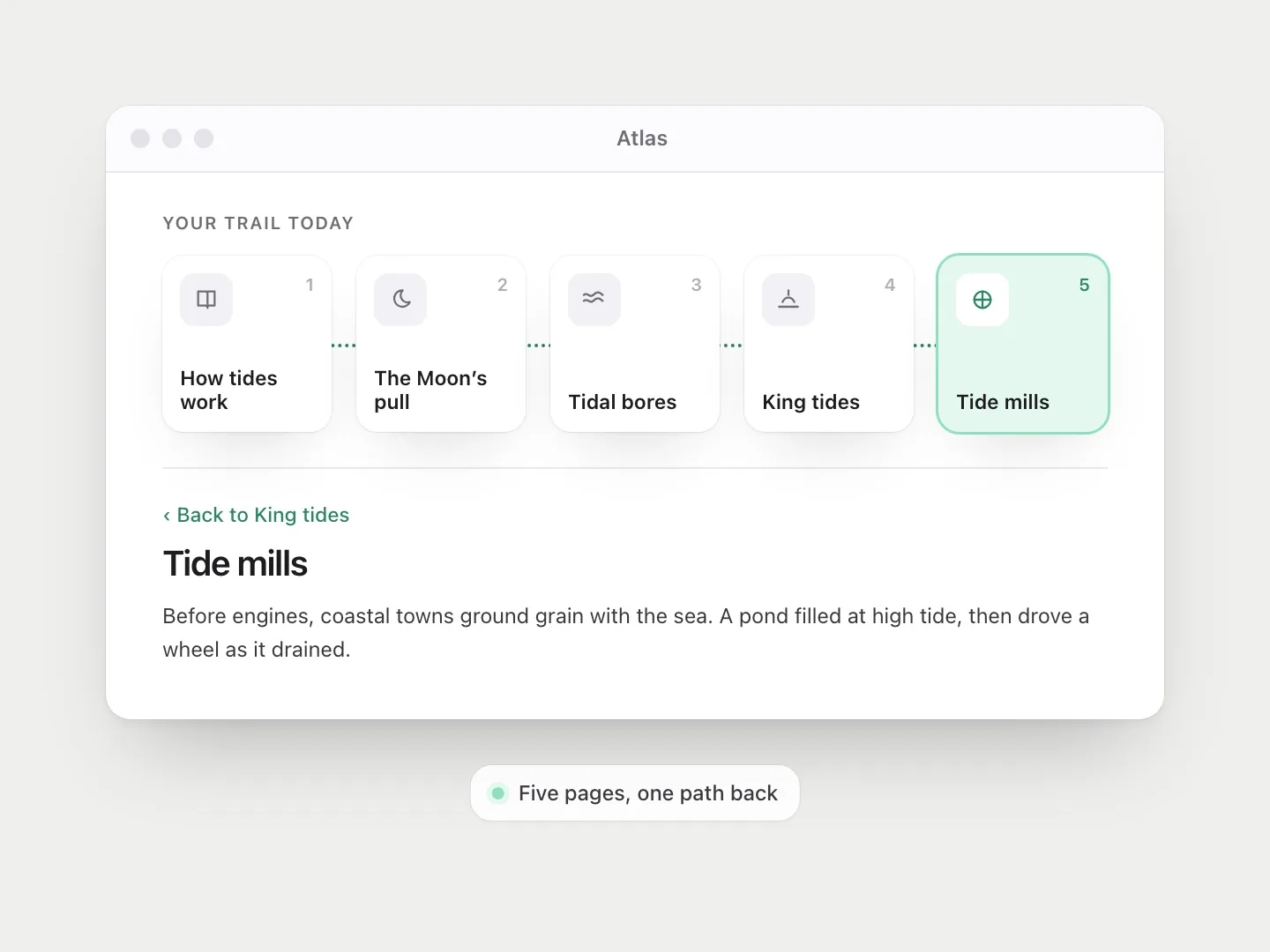
Make the path visible. When you wander, it helps to see where you’ve been. A trail of the last few steps turns getting lost into an adventure instead of a worry, because you can always find your way back. It also respects the hunters, who, in Lydon-Staley’s data, like to circle back.
Reward connections, not completion. If you link two things together, the product could notice and surface more connections like it. The satisfying moment is “oh, those are related”, not “task complete”.
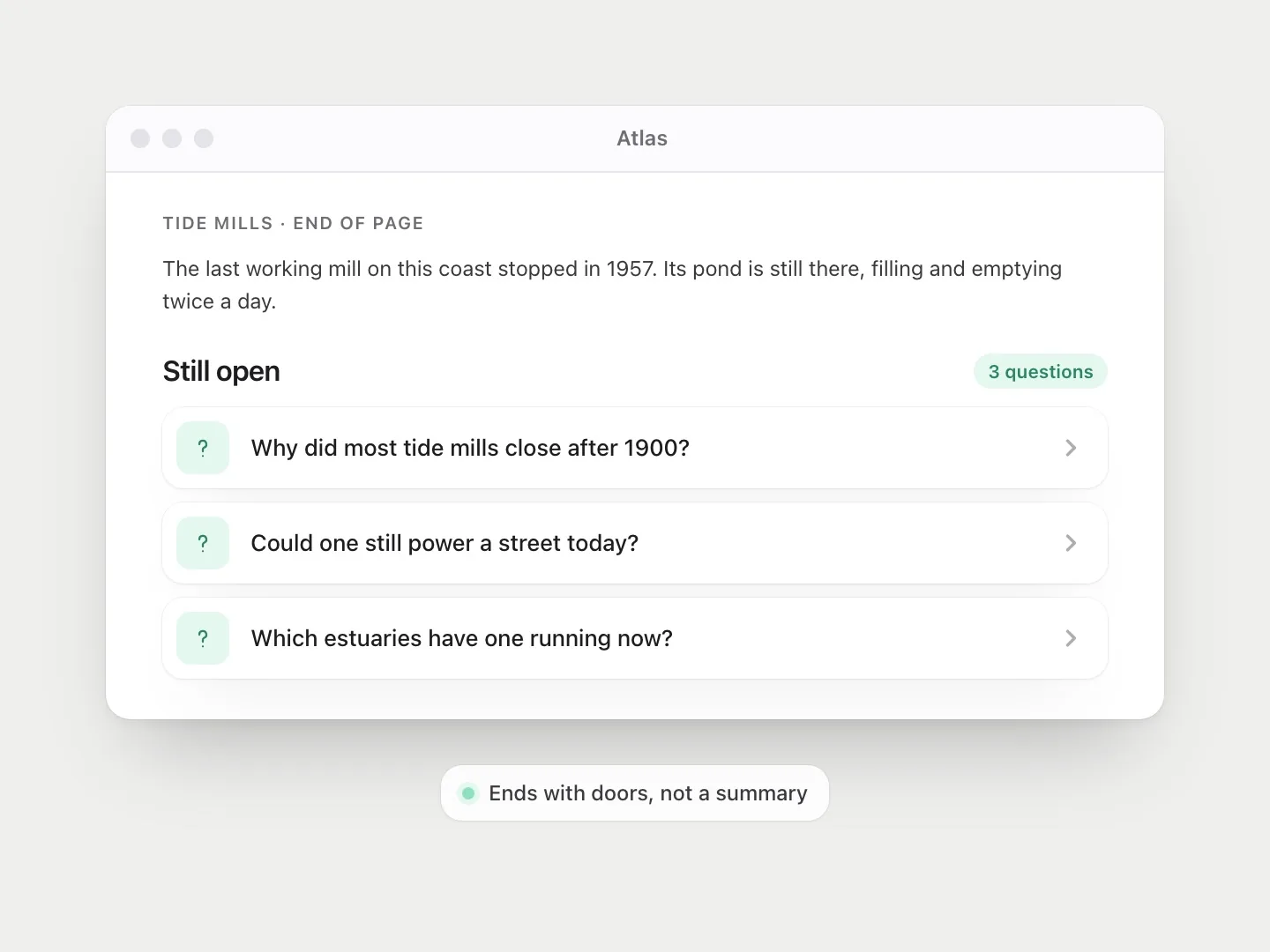
Leave things unfinished. A question at the end of a page, a half-shown map, a “you might not know…” line. A small gap invites the next step better than a full summary. The research suggests one condition: it has to be a gap the person can see the shape of. Too obscure and it reads as noise. Too obvious and there’s nothing left to wonder about.
Keep it calm. Curiosity is not the same as compulsion. Infinite feeds also keep you moving, but through a feeling of not wanting to miss out. Real curiosity feels spacious. You can stop any time and still feel like you got something.
Curiosity versus engagement
There’s a risk here. “Keep people exploring” sounds a lot like “keep people scrolling”, and the engagement-driven version of this idea is everywhere. The difference is what people leave with.
The uncomfortable fact is that curiosity is easy to exploit. Christopher Hsee and Bowen Ruan ran four experiments in which curiosity led people to expose themselves to unpleasant things, including mild electric shocks, for no apparent benefit. Their reading is that we have a drive to resolve uncertainty that works independently of whether resolving it is good for us. That’s the mechanism behind every “you won’t believe what happened next” headline. The gap is real, the itch is real, and the answer is worthless.
So the information gap on its own can’t be the line between good and bad design. Clickbait uses exactly the same gap. What differs is whether the payoff is worth the itch, and whether the person stays in charge of where they go next.
That second part has evidence behind it. Kai Lukoff and colleagues asked YouTube users which parts of the app made them feel in control of their own use. Autoplay and recommendations mostly undermined people’s sense of agency. Playlists and search mostly supported it. The interesting thing is that all four can lead somewhere new. The difference is who chooses the next step. A curious interface offers doors. A compulsive one opens them for you.
A compulsive product leaves you tired. A curious one leaves you with something you didn’t know you wanted to know.
That suggests different metrics. Instead of time spent, a curiosity-first product might look at how many distinct ideas someone met, whether they came back to something on their own, or simply whether they’d describe the session as worth it. These are harder to measure than clicks, but they line up with what people actually value. The Wikipedia studies hint at another one: the shape of the path itself. A session that wanders widely and then circles back looks very different in the data from one that drifts forward forever.
Where this already happens
Some products get close. Wikipedia does it almost by accident: every page is dense with doorways. Are.na lets people build connected collections of ideas that others can follow. Good museum guides suggest a route but are happy when you leave it. Parallax, a project of mine, works in a related way. It doesn’t give you a conclusion, it opens up the assumptions behind your opinion and lets you see the ideas around it on an argument map.
What these have in common is that the product treats the person as someone who wants to understand, not someone who wants to be finished. None of them decide where you go next. They make the next step visible and leave the choice with you.
A design exercise
Take any product you’re working on and ask: what would this look like if the goal was for someone to leave knowing something new, rather than leaving sooner? You probably won’t ship the full answer. But you’ll usually find one small place, maybe an empty state, a search result or the end of an article, where a little curiosity would make the whole thing feel more alive.
When you find it, ask two more questions. Is the gap one this person can actually see the shape of? And is what’s on the other side worth the itch? If both answers are yes, you’re designing for curiosity. If only the first is, you’re designing clickbait.
References
9
- Gruber, M. J., Gelman, B. D. & Ranganath, C. (2014). States of curiosity modulate hippocampus-dependent learning via the dopaminergic circuit. Neuron, 84(2), 486–496. doi.org/10.1016/j.neuron.2014.08.060
- Hsee, C. K. & Ruan, B. (2016). The Pandora effect: The power and peril of curiosity. Psychological Science, 27(5), 659–666. doi.org/10.1177/0956797616631733
- Kang, M. J., Hsu, M., Krajbich, I. M., Loewenstein, G., McClure, S. M., Wang, J. T. & Camerer, C. F. (2009). The wick in the candle of learning: Epistemic curiosity activates reward circuitry and enhances memory. Psychological Science, 20(8), 963–973. doi.org/10.1111/j.1467-9280.2009.02402.x
- Keller, N. E., Salvi, C., Leiker, E. K., Gruber, M. J. & Dunsmoor, J. E. (2024). States of epistemic curiosity interfere with memory for incidental scholastic facts. npj Science of Learning, 9, 22. doi.org/10.1038/s41539-024-00234-w
- Loewenstein, G. (1994). The psychology of curiosity: A review and reinterpretation. Psychological Bulletin, 116(1), 75–98. doi.org/10.1037/0033-2909.116.1.75
- Lukoff, K., Lyngs, U., Zade, H., Liao, J. V., Choi, J., Fan, K., Munson, S. A. & Hiniker, A. (2021). How the design of YouTube influences user sense of agency. In Proceedings of the 2021 CHI Conference on Human Factors in Computing Systems (pp. 1–17). ACM. doi.org/10.1145/3411764.3445467
- Lydon-Staley, D. M., Zhou, D., Blevins, A. S., Zurn, P. & Bassett, D. S. (2021). Hunters, busybodies and the knowledge network building associated with deprivation curiosity. Nature Human Behaviour, 5(3), 327–336. doi.org/10.1038/s41562-020-00985-7
- Pirolli, P. & Card, S. (1999). Information foraging. Psychological Review, 106(4), 643–675. doi.org/10.1037/0033-295X.106.4.643
- Singer, P., Lemmerich, F., West, R., Zia, L., Wulczyn, E., Strohmaier, M. & Leskovec, J. (2017). Why we read Wikipedia. In Proceedings of the 26th International Conference on World Wide Web (pp. 1591–1600). doi.org/10.1145/3038912.3052716