Unsolicited redesign · Mobile and web · 33 screens · 2026

CraigslistThe most useful site in town, made easier to use.

Craigslist covers more of local life than any other site: things for sale, apartments, jobs, gigs, services, events and forums, all free to browse and private by default. Before drawing a screen, I asked what was actually failing the people who use it. The answer wasn’t how it looks.
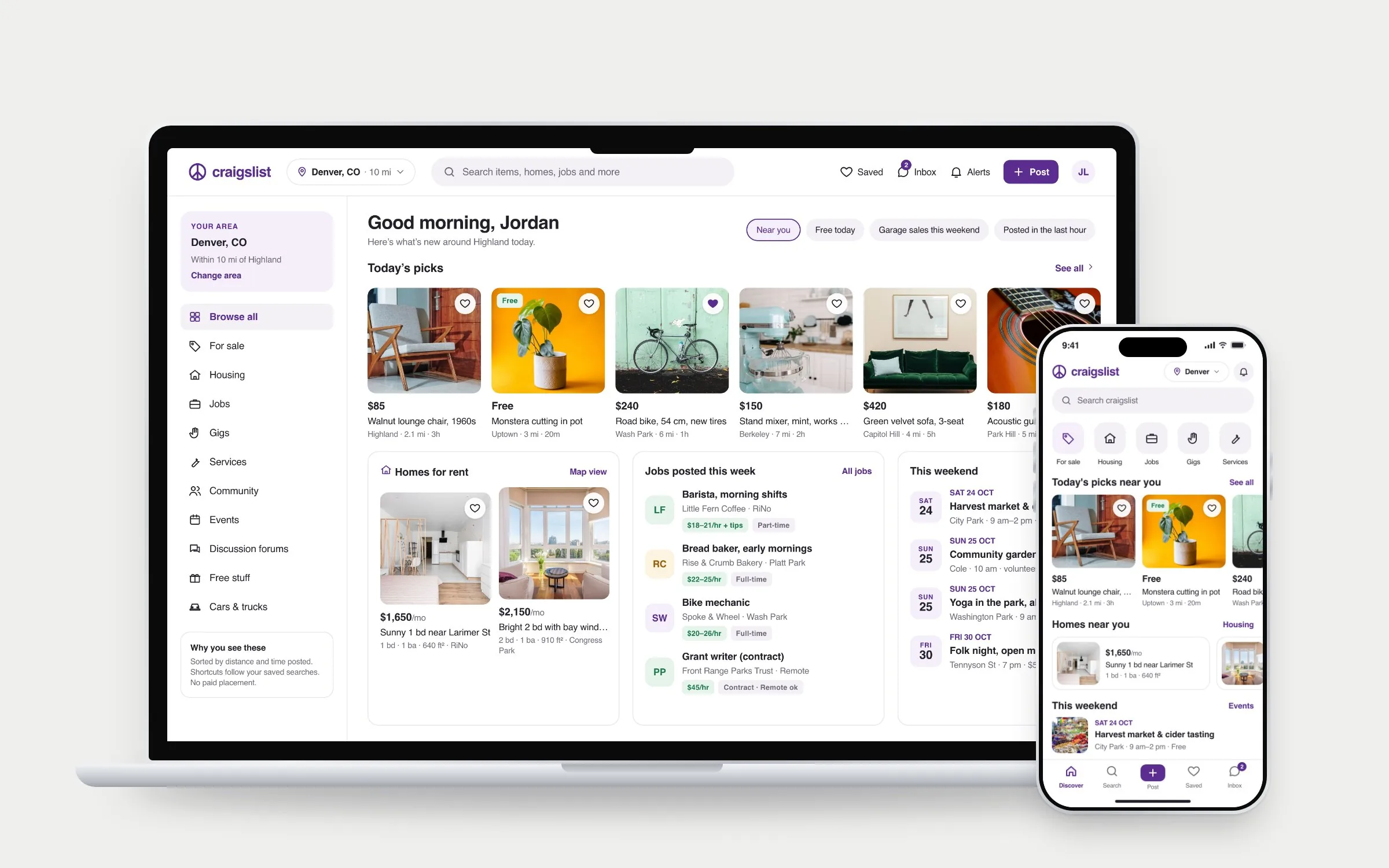
The redesigned Craigslist Denver home page on a silver MacBook beside the mobile home screen on a silver iPhone, both showing photo listings, homes for rent, jobs and weekend events
Role
Solo: problem framing, product audit, information architecture, interaction and visual design
Scope
33 screens, each designed for mobile and desktop
Tools
Figma
Platform
iPhone and desktop web
Setting
Denver, with real neighborhoods. Listings, people and businesses are fictional
Research
A review of the live Denver site. No user testing yet; the plan is in section 06
Status
An independent concept, not affiliated with or endorsed by Craigslist. Features Craigslist doesn't have today are labeled “Concept” in the screens.
01

The real problem

The obvious brief was “make Craigslist look modern.” I didn’t think that was the right problem.

People keep using Craigslist despite how it looks, so the look isn’t what’s failing them. Going through the live Denver site, the friction came from the work it leaves to people: finding the right one of hundreds of categories, judging whether a post is real, working out what an apartment will actually cost, and spotting a scam at the moment it matters.

The stakes are higher than on most sites. A bad listing can cost a security deposit or mean meeting a stranger. So I reframed the brief:
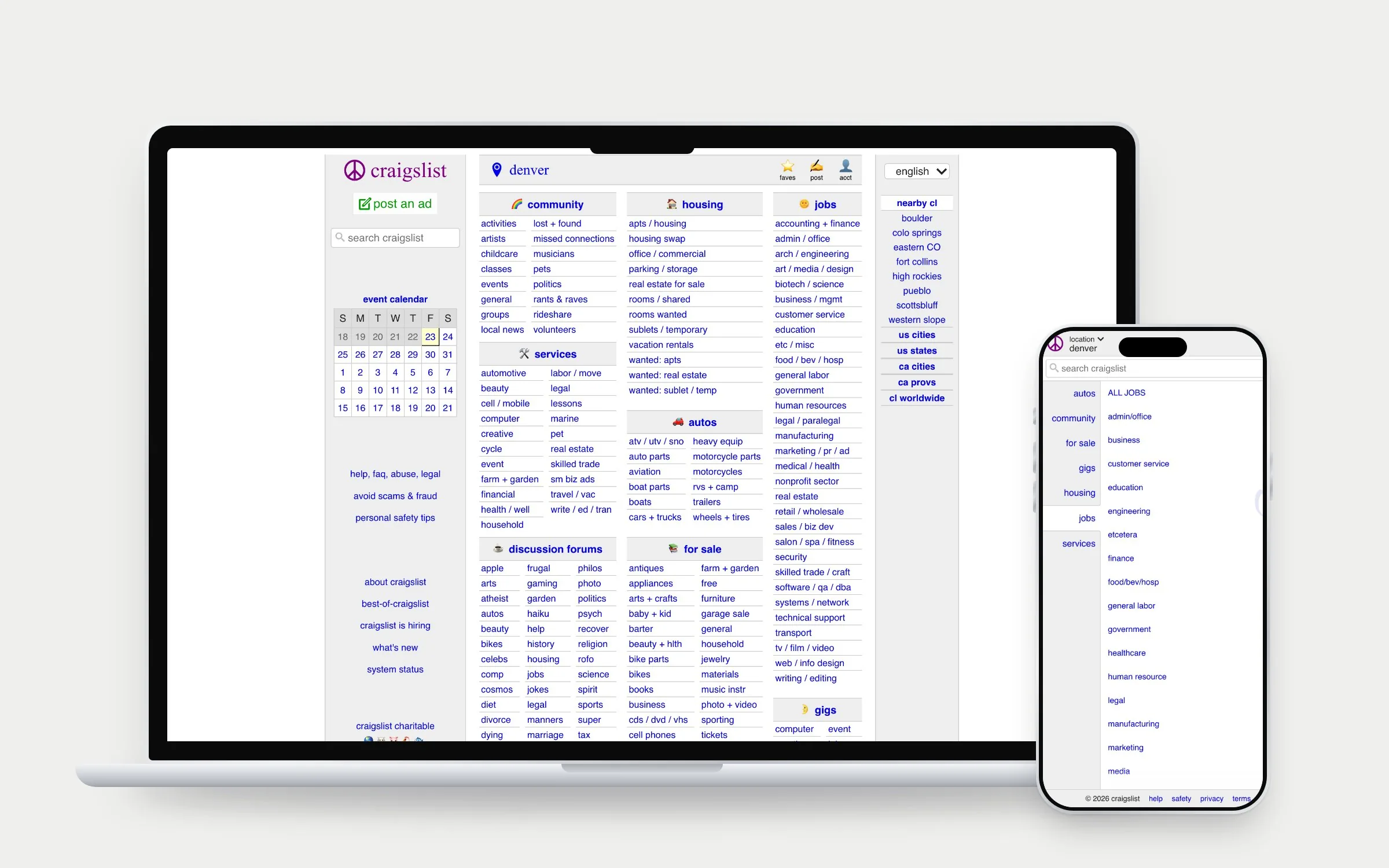
The current Craigslist Denver home page on a MacBook, a dense grid of small blue text links, and the current mobile home, a plain list of category names

How might I make it faster to find, judge and act on a local post, without giving up the privacy and simplicity that keep people coming back?

02

What I found on the live site

A wall of links

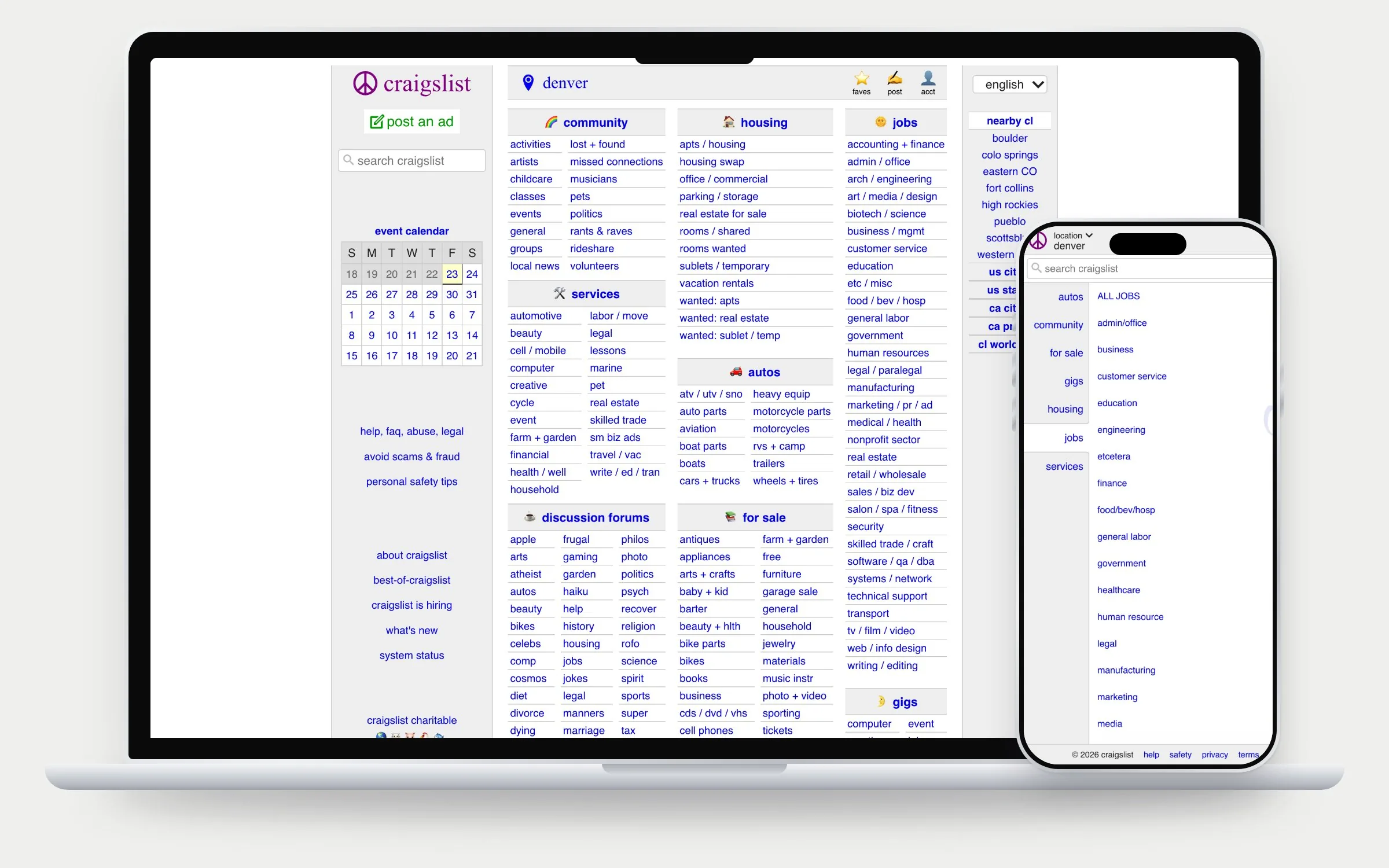
The Denver home page shows more than 400 small text links at once. It’s a site map, not a starting point: nothing to look at until you pick a category.

Mobile starts with a list

On a phone the home page is a plain list of category names, and you drill down before seeing a single post.

Key facts depend on the poster

Posts are mostly free text, so whether a rental lists its deposit and fees is up to whoever wrote it. Missing facts mean more messages before anyone can decide.

Safety advice sits far from risk

Good scam guidance exists, but in small links on the home page, not where people reply, rent or pay.
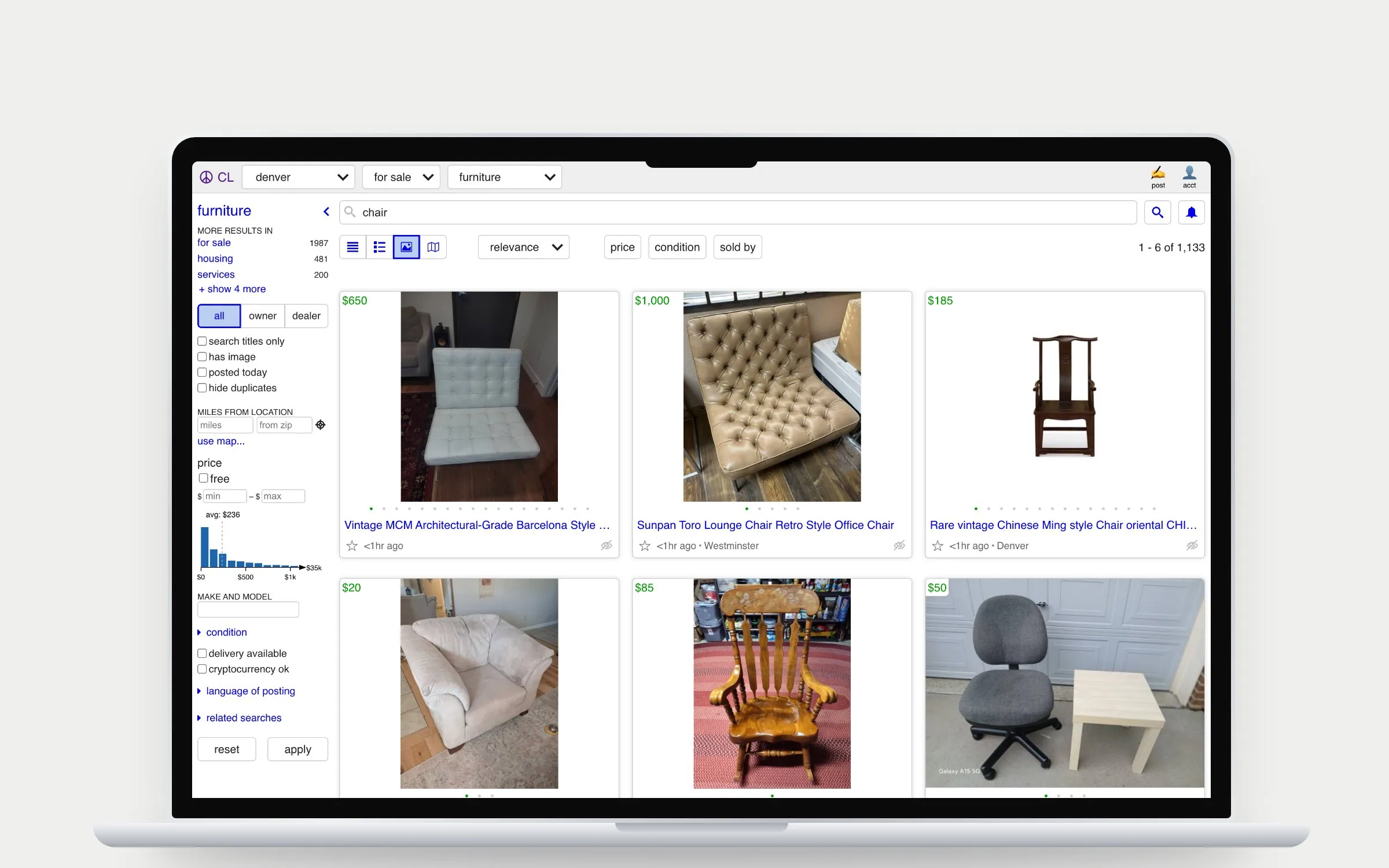
Current Craigslist search results for chair in furniture, shown in gallery view with photos, a dense filter column on the left and small type

Not everything was broken. Search already has photo and map views, so I kept its model and fixed the density around it.

03

Assumptions I challenged

I wrote down the first ideas any marketplace redesign reaches for, then tested each against what Craigslist is for. Most didn’t survive.

Rejected

“Add a personalized feed”

Why not
Personalization needs accounts and tracking. That breaks the anonymity people come for.
Instead
Discovery by place and time: what’s new, near you.
Rejected

“Add seller ratings”

Why not
On an account-optional site, ratings are easy to fake and would push everyone into profiles.
Instead
Facts that can be checked: email confirmed, posting since, phone not verified.
Rejected

“Replace email with chat”

Why not
Relay email works, needs no app, and hides both addresses.
Instead
Keep relay as the default. Offer an inbox as an option, labeled as a concept to test.
Changed

“Start with the home page”

Why not
The riskiest moments are replying, renting and paying, not landing.
Instead
Design the listing, reply and housing screens first, and put safety there.
04

Constraints I designed within

Business

No ads, fees on a few posts

Craigslist runs without display ads and charges only in some categories, like cars by owner and jobs. So no promoted listings or boosts; instead, fees are shown up front at the start of posting.

Technical

Free-text posts, any device

Posts are written by anyone, so new structured fields are optional and the layout survives missing data. Screens stay light for older phones and slow connections.

People

Don’t break the regulars

Long-time users know exactly where things are. The full category list stays one tap away, and results still sort by time and distance.

05

The redesign

01 · Discover

A home page you can browse

The link wall becomes category shortcuts and what’s new nearby across for sale, homes, jobs and events. Every category is still reachable in one tap.
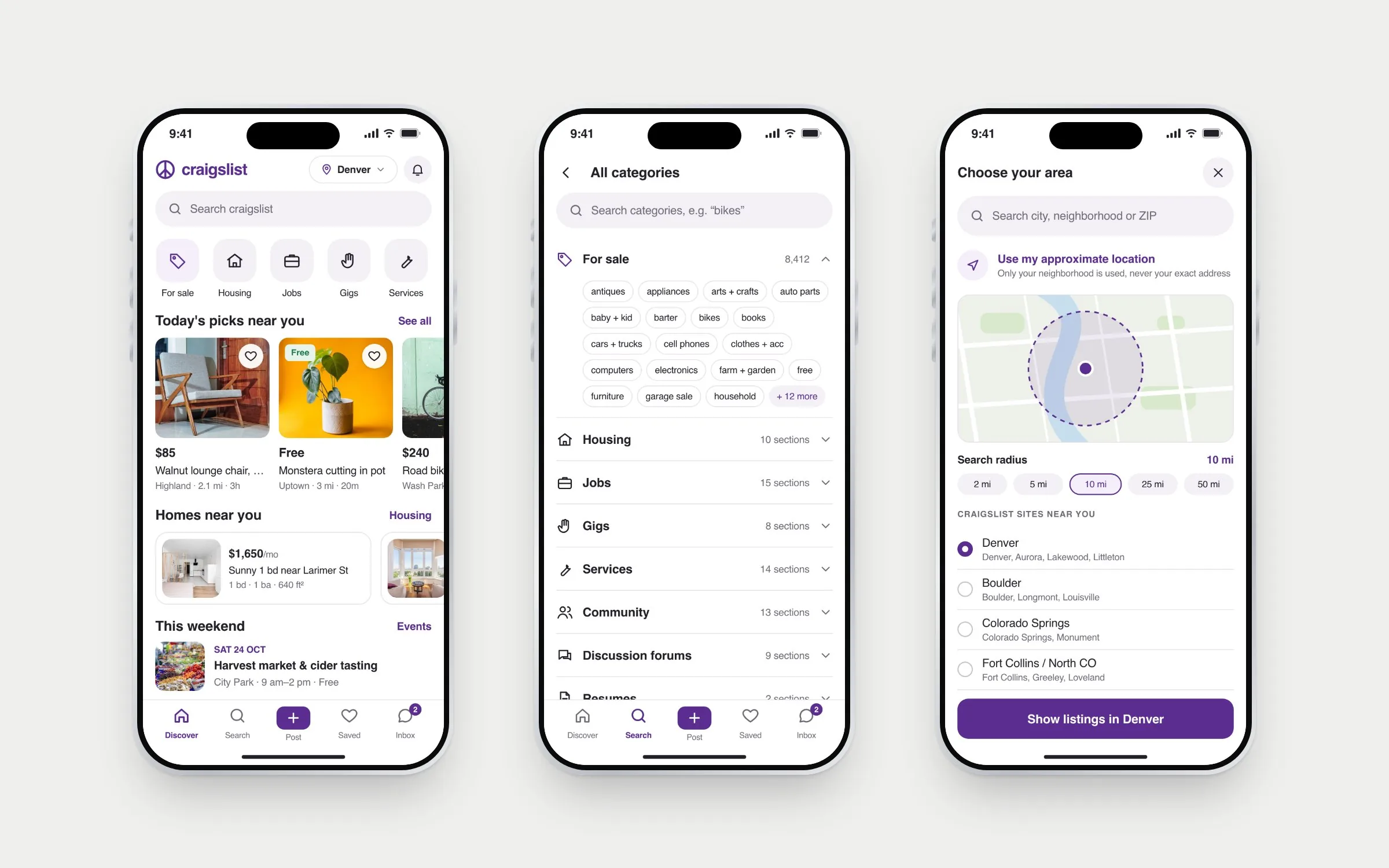
Three iPhones: the Discover home with category shortcuts and photo listings, the full category list with every for-sale section, and the area picker with a radius map
Craigslist today: the Denver home page on a MacBook, a dense grid of category links, and the mobile category list on an iPhone
Craigslist today. Every category at once on desktop; a bare list on mobile.
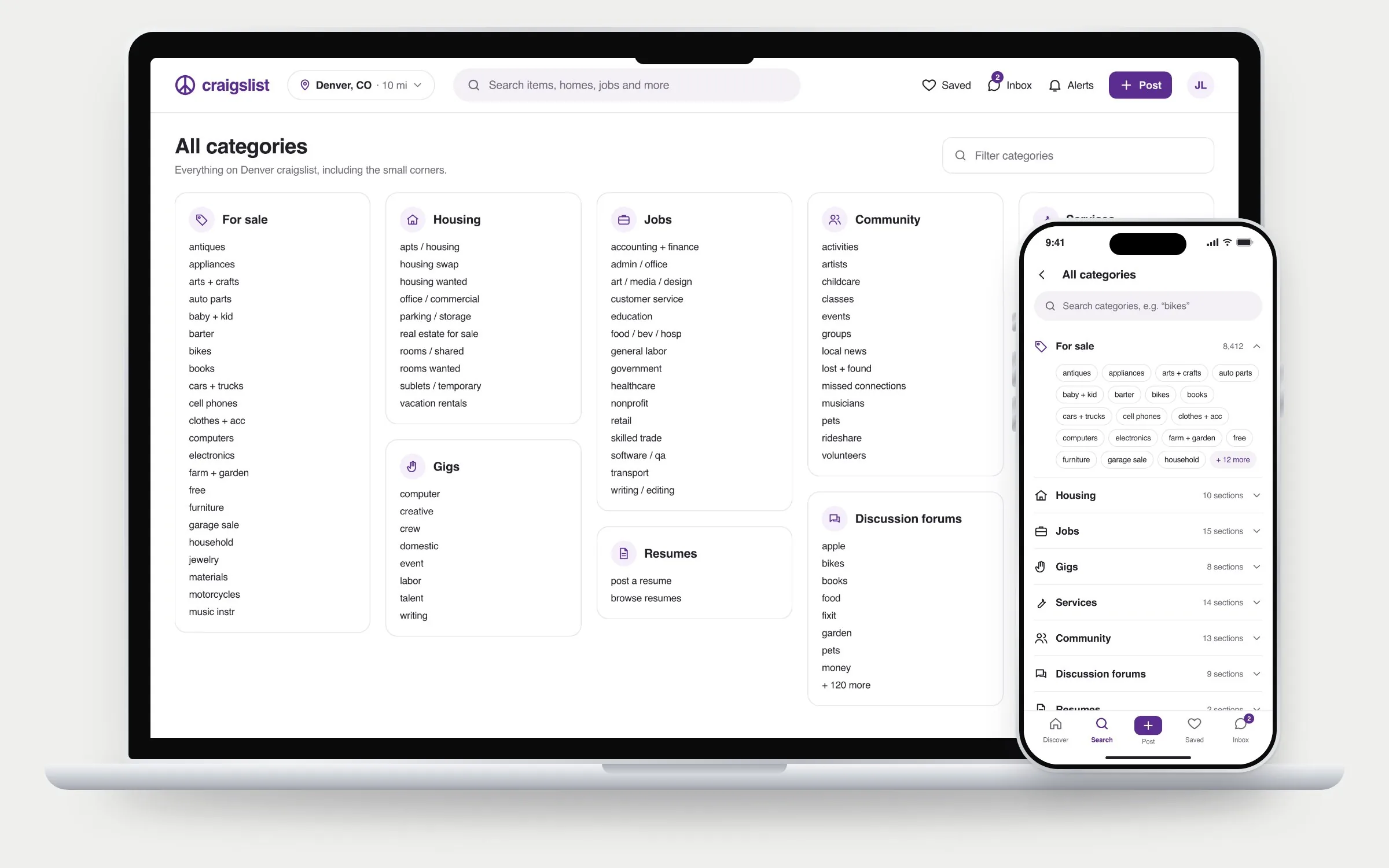
Redesigned All categories: grouped cards with icons on a MacBook, and an expandable category list with section chips on an iPhone
Redesigned. The same categories, grouped, searchable and easy to tap.

I kept every category, even the small ones, because they’re what make Craigslist different. The change is how they’re reached: grouped with icons, a filter on desktop, and collapsible groups with large tap targets on mobile.

02 · Search

Search, filter, then save it

Active filters are chips you remove in one tap. Filters open in a sheet with a live result count, and any search can become an email alert, which removes the need to keep checking back.
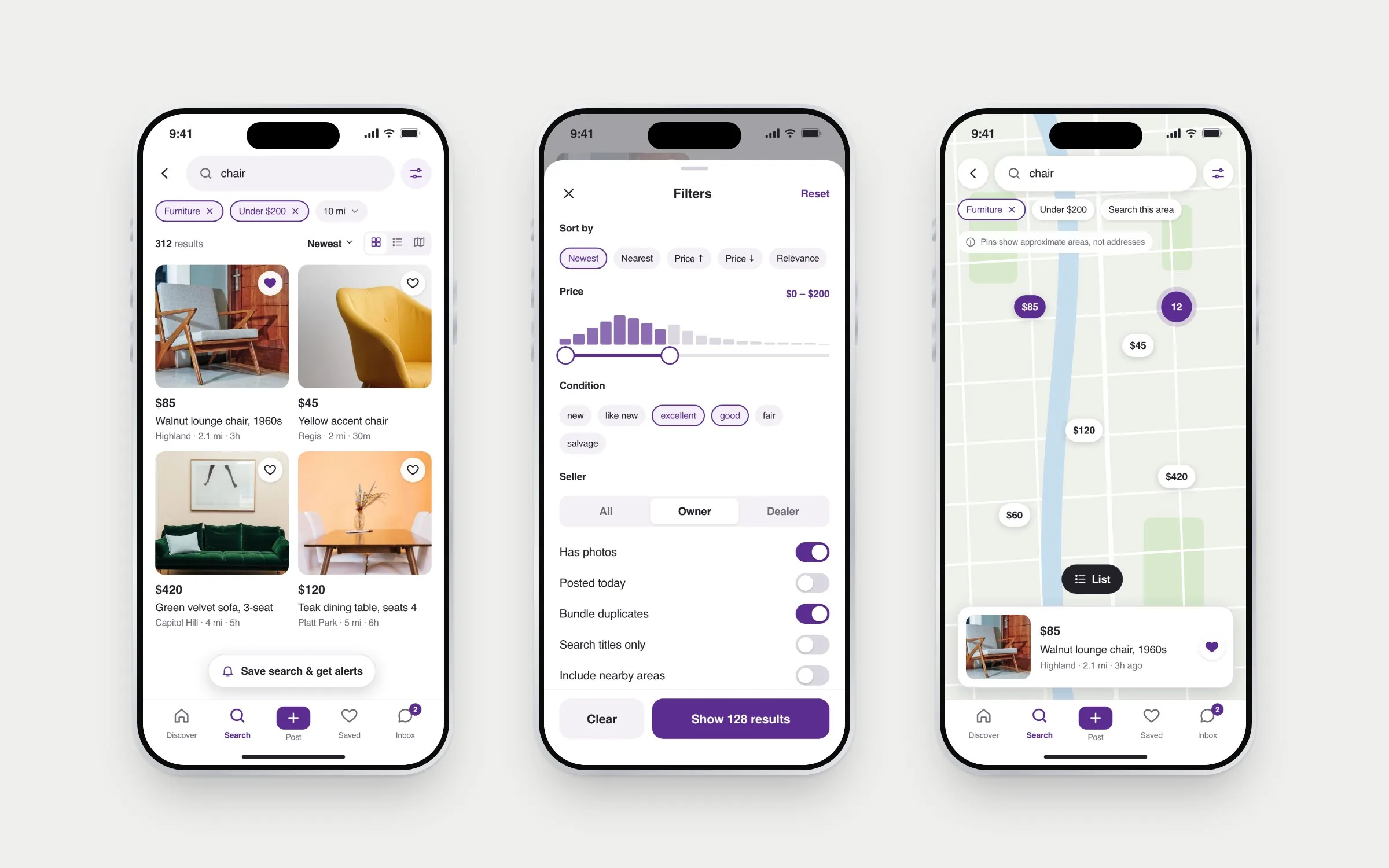
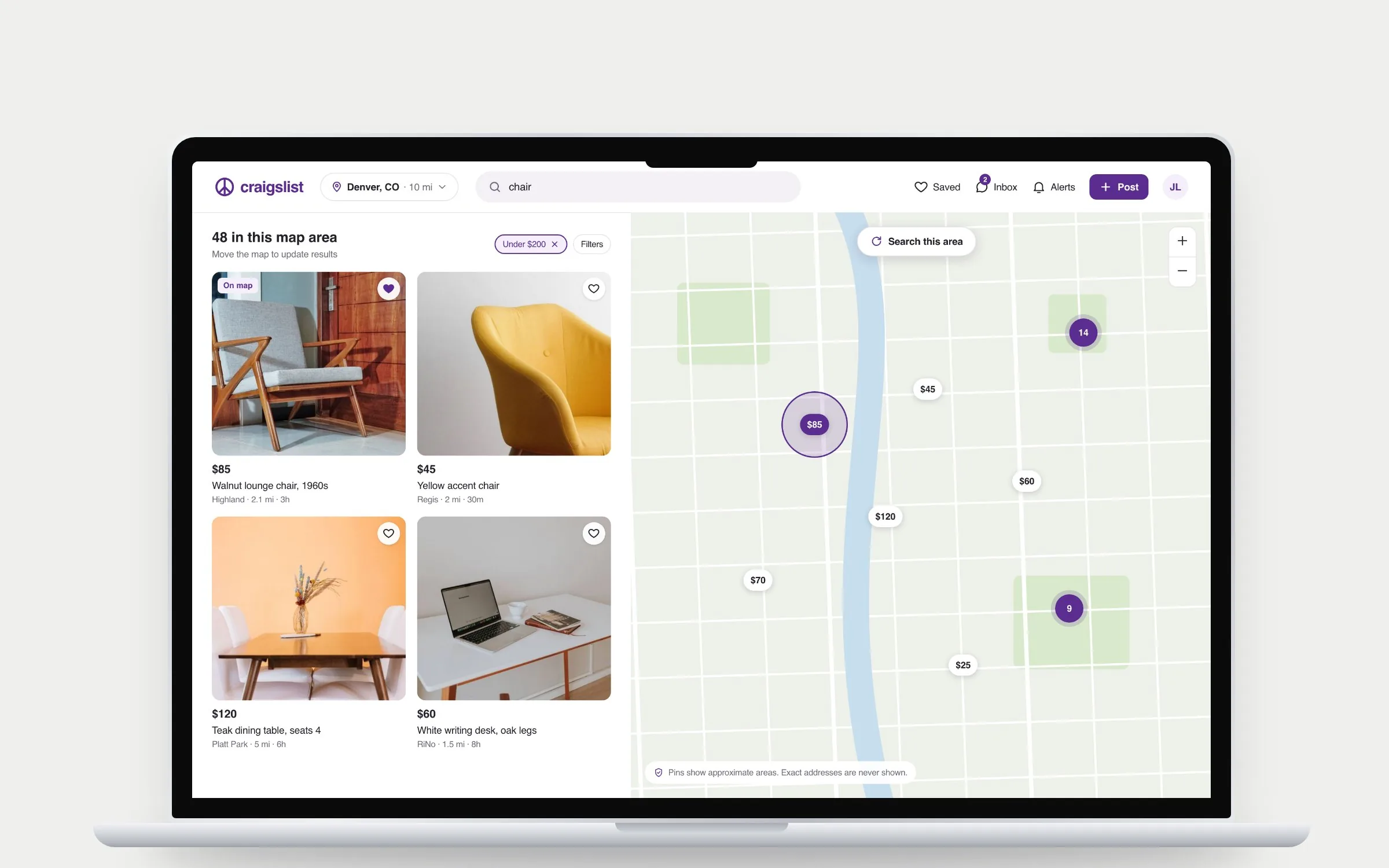
Three iPhones: search results for chair in a two-column photo grid, the filters sheet with a price histogram and condition chips, and the map view with price pins
Desktop map view on a MacBook: listing cards on the left, price pins and clusters on a map on the right, with a note that pins show approximate areas

Pins mark an approximate area. A map is more useful, but not at the cost of a seller’s home address.

03 · Listing

Everything you need to decide

Big photos, structured details and an approximate area. The poster panel shows checkable facts instead of ratings, including the unflattering ones like “phone not verified.”
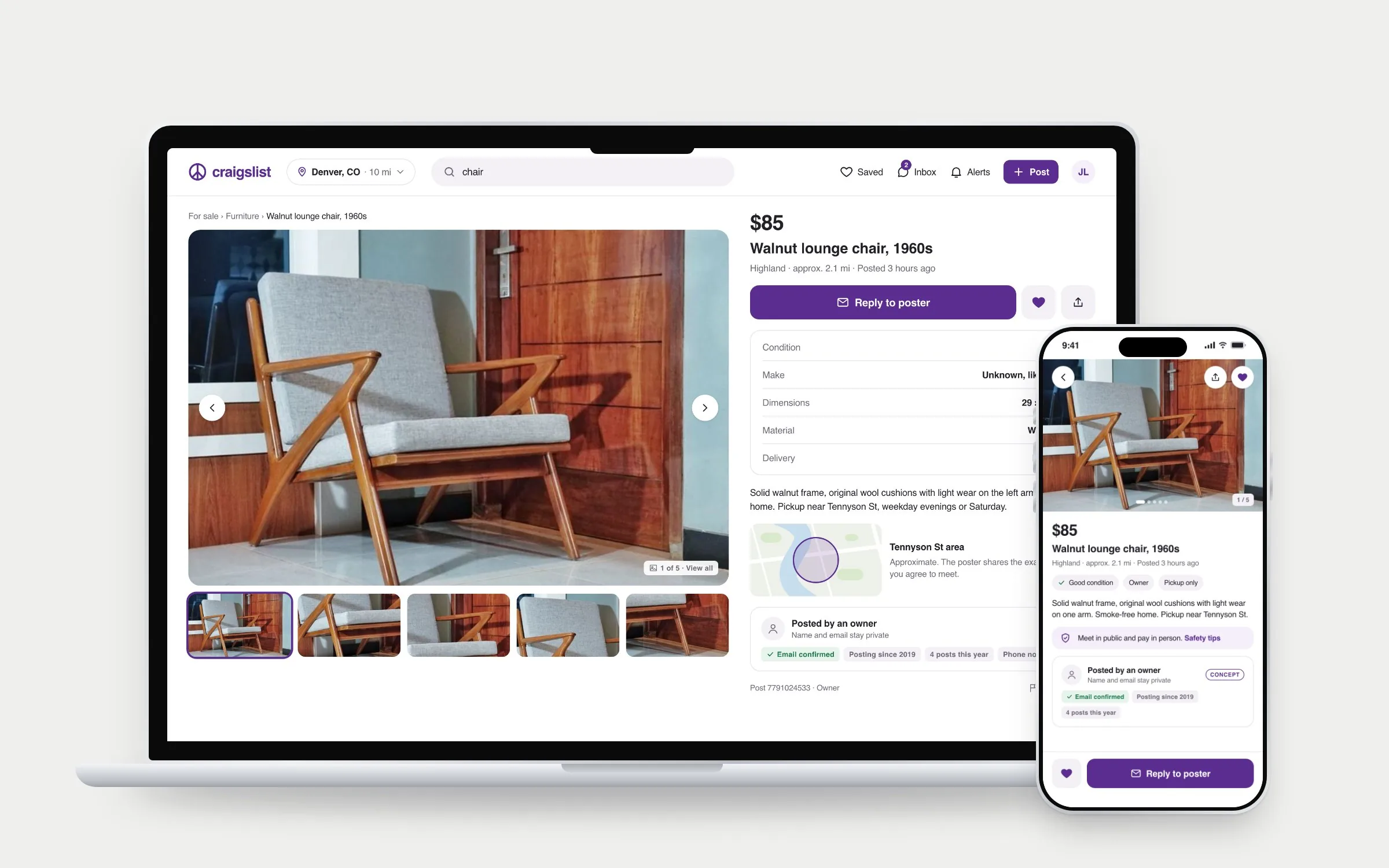
A listing for a walnut lounge chair on a MacBook and an iPhone: large photo gallery, price, details table, approximate map area, and a poster panel with verifiable facts
04 · Contact and save

Reply without giving yourself away

Relay email stays the default, with quick replies and a scam warning inside the reply sheet. The inbox is optional and labeled as a concept. Saved items sort into collections.
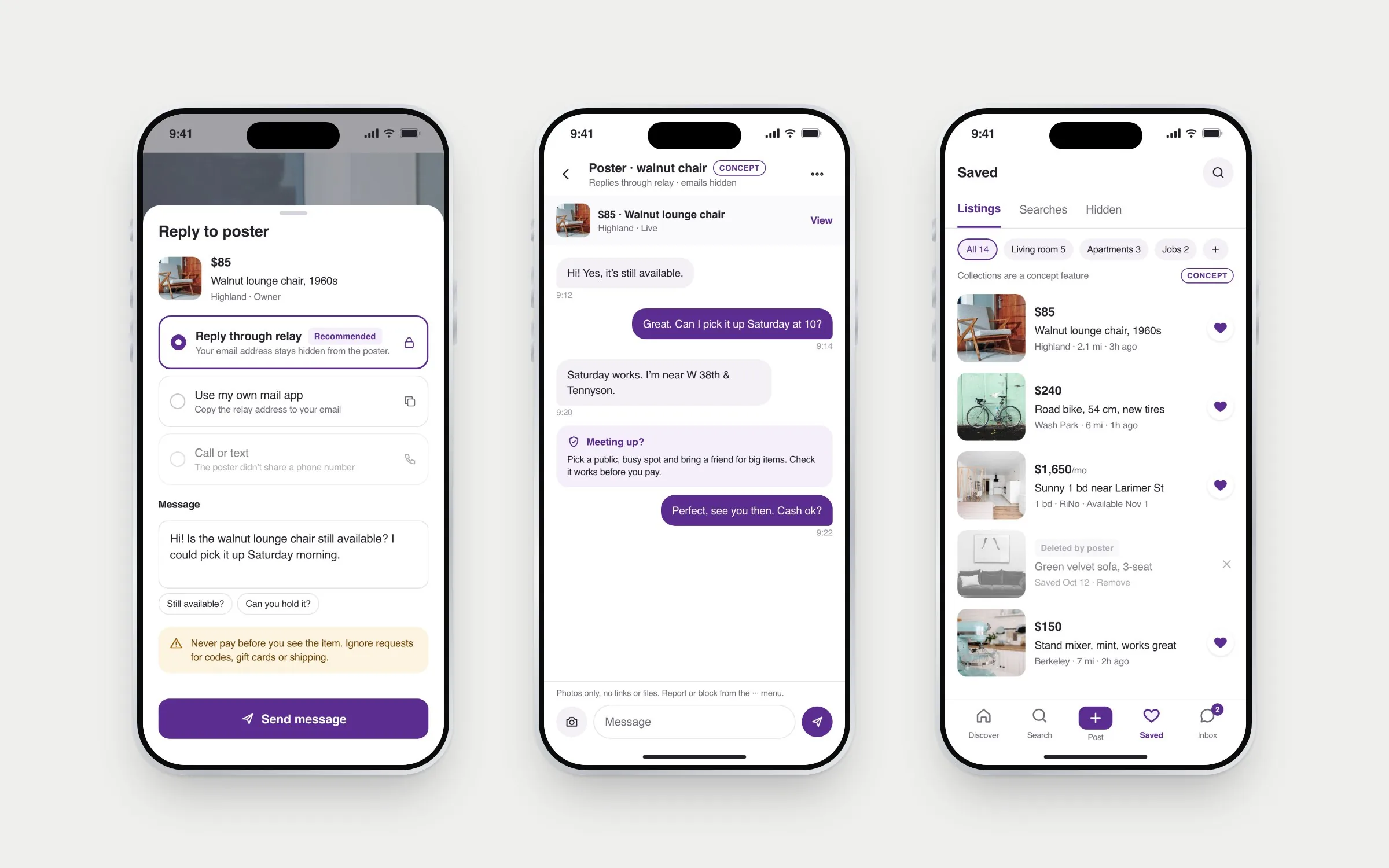
Three iPhones: the reply sheet with relay email selected and a payment warning, an in-app conversation with a meet-up safety card, and saved listings grouped into collections
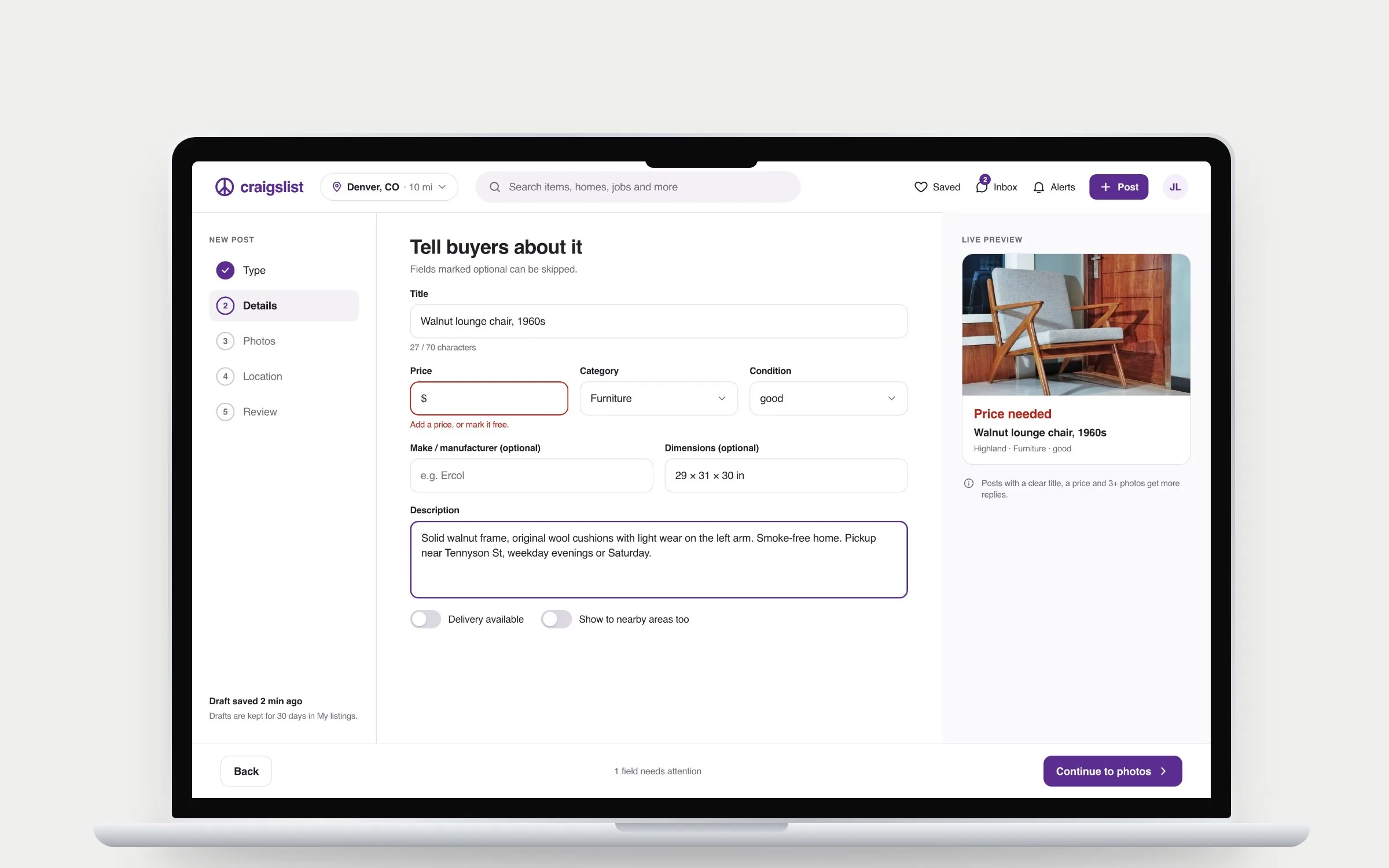
05 · Post

Posting in five short steps

The post type comes first, so the form only asks what that type needs and any fee is clear before you start. It ends with the post exactly as buyers will see it.
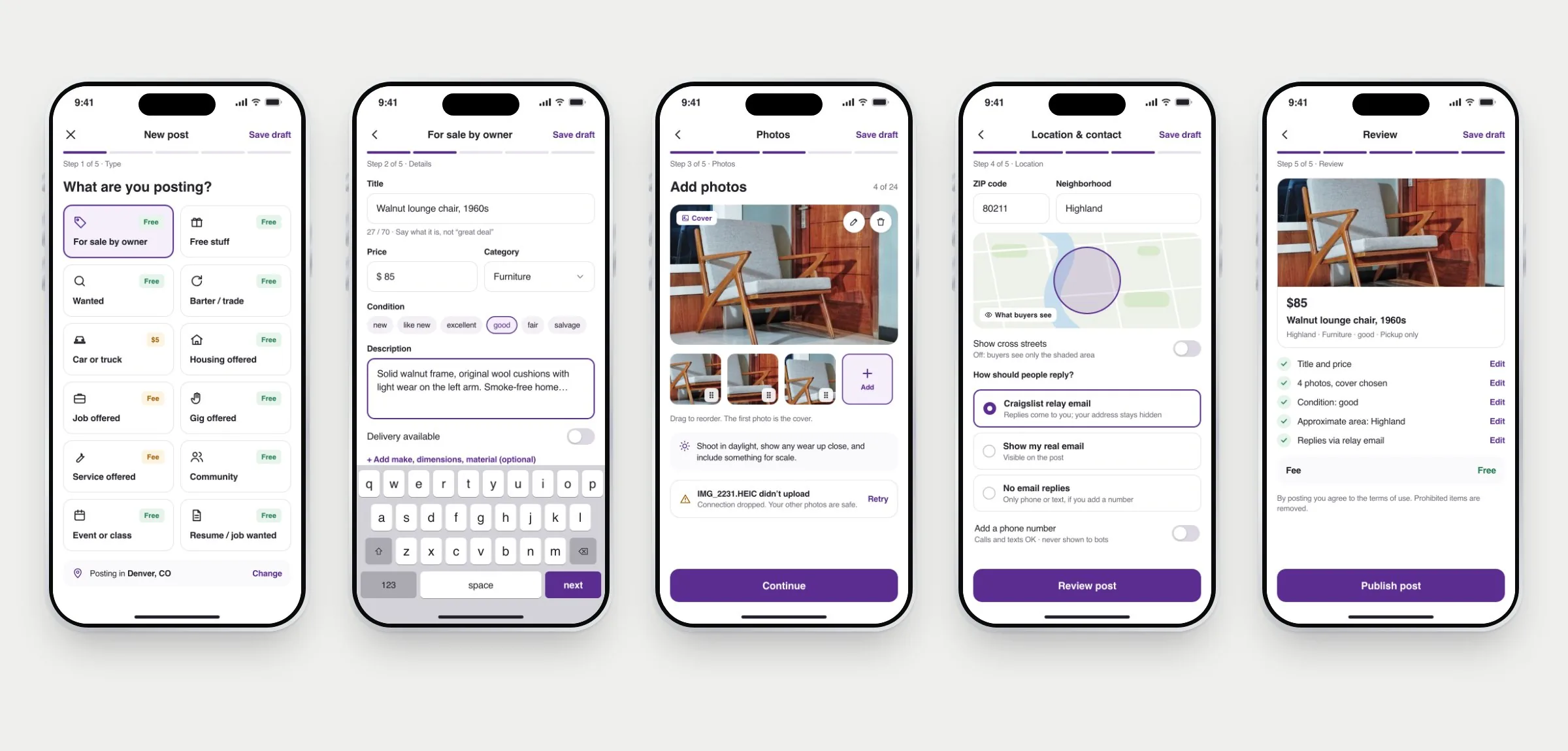
Five iPhones showing the posting flow: choose a post type with fees, item details, photos with a cover image, location and reply method, and the final review
Desktop posting details step with a step list on the left, an inline price error, and a live preview of the listing on the right
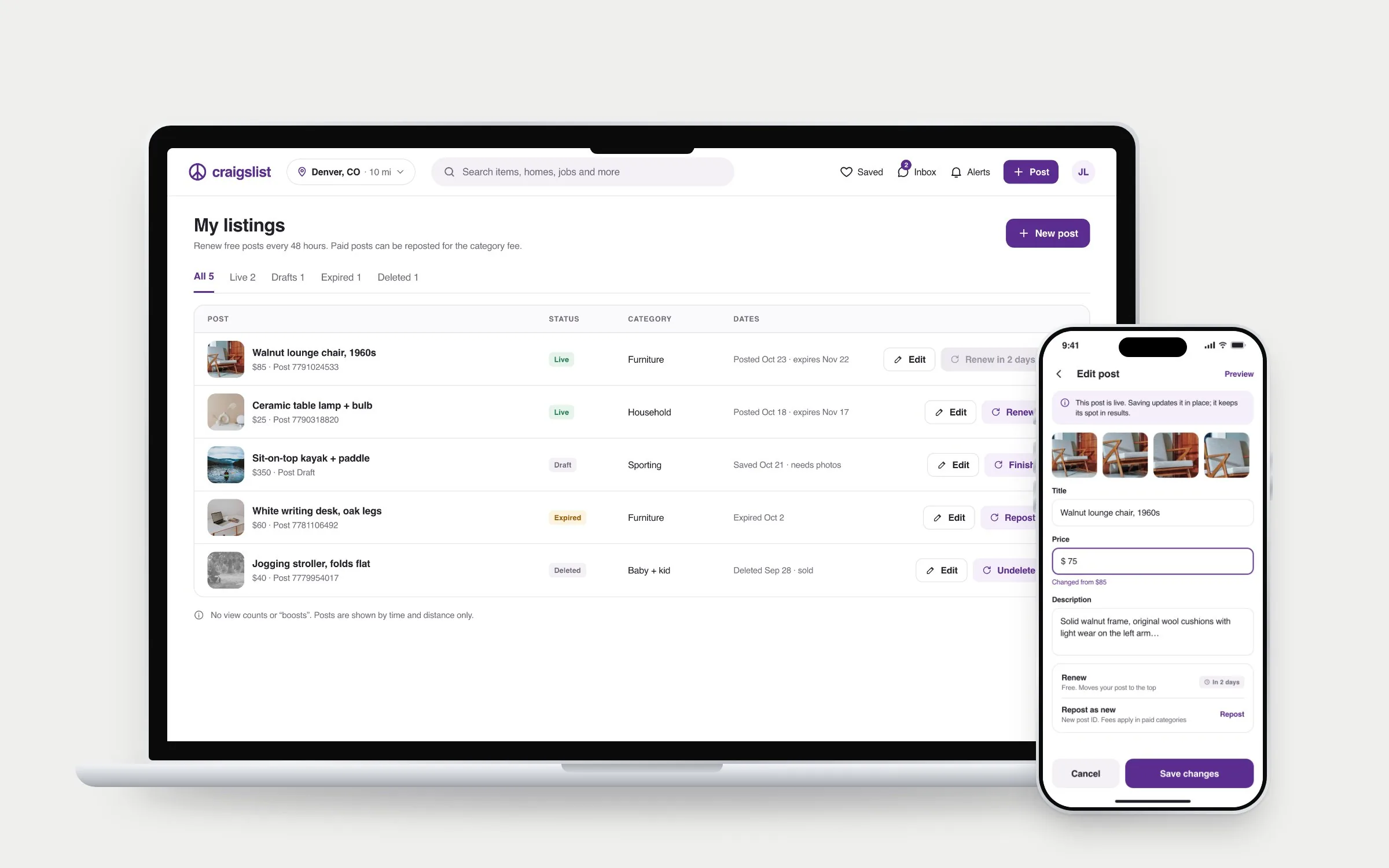
My listings on a MacBook with live, draft, expired and deleted posts and their actions, beside the edit post screen on an iPhone

The tradeoff: five steps is more screens than one form. I accepted it because each step is short, drafts save automatically, and a seller can see what’s missing before buyers do. Whether it’s actually faster is the first thing I’d test.

06 · Housing

Apartments, with the costs up front

The listing adds up move-in costs and flags what the landlord didn’t list, so renters know what to ask before they send money.
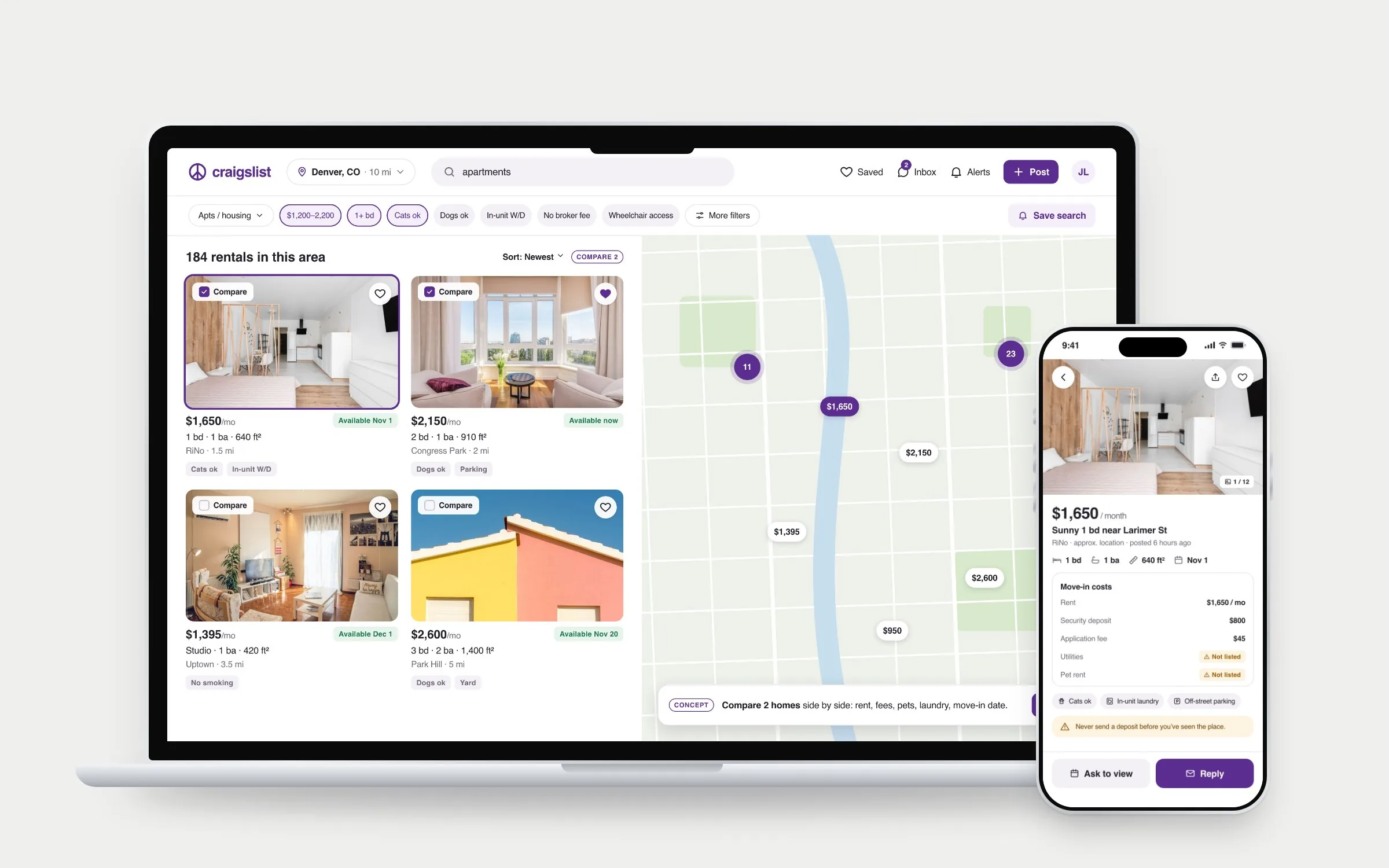
Rental search on a MacBook with photo cards, compare checkboxes and a price map, beside a rental listing on an iPhone showing move-in costs with missing items flagged
07 · Jobs

Jobs that lead with pay

Pay, hours and type show on every result, and “Pay not listed” is said out loud. A private application tracker is a concept to test.
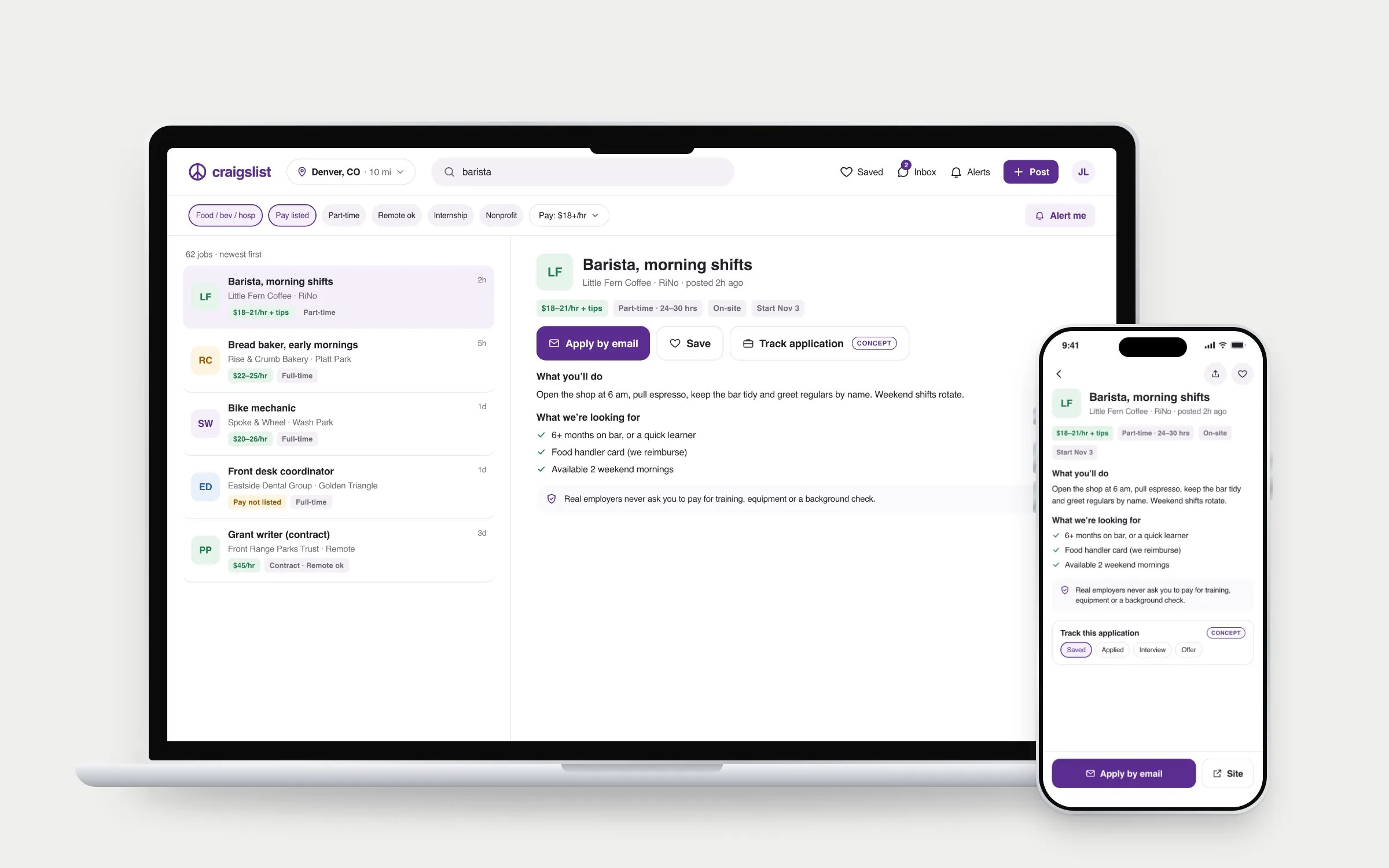
Job search on a MacBook with a results list and the selected barista job open beside it, and the job detail on an iPhone with an application tracker
08 · Community

The parts only Craigslist has

Gigs, services, events, lost and found and the forums get the same care as for-sale. Forum handles keep people anonymous.
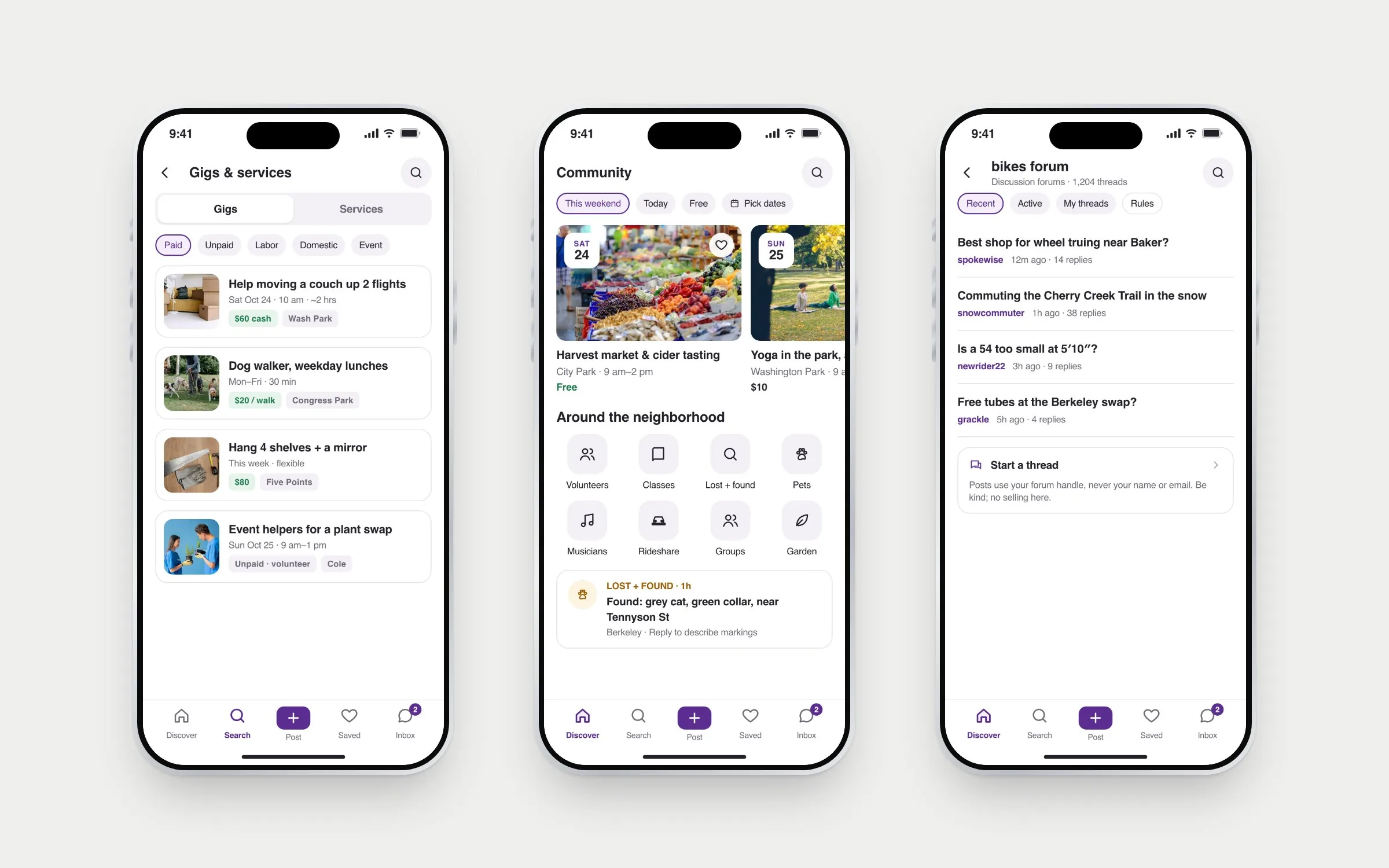
Three iPhones: gigs with pay and dates, community events for the weekend with neighborhood shortcuts, and the bikes discussion forum
09 · Trust and states

Safety where it’s needed

Flagging is anonymous: pick a reason and send. Empty and offline states keep your filters and offer a next step. Signing in is optional, and the screen says so.
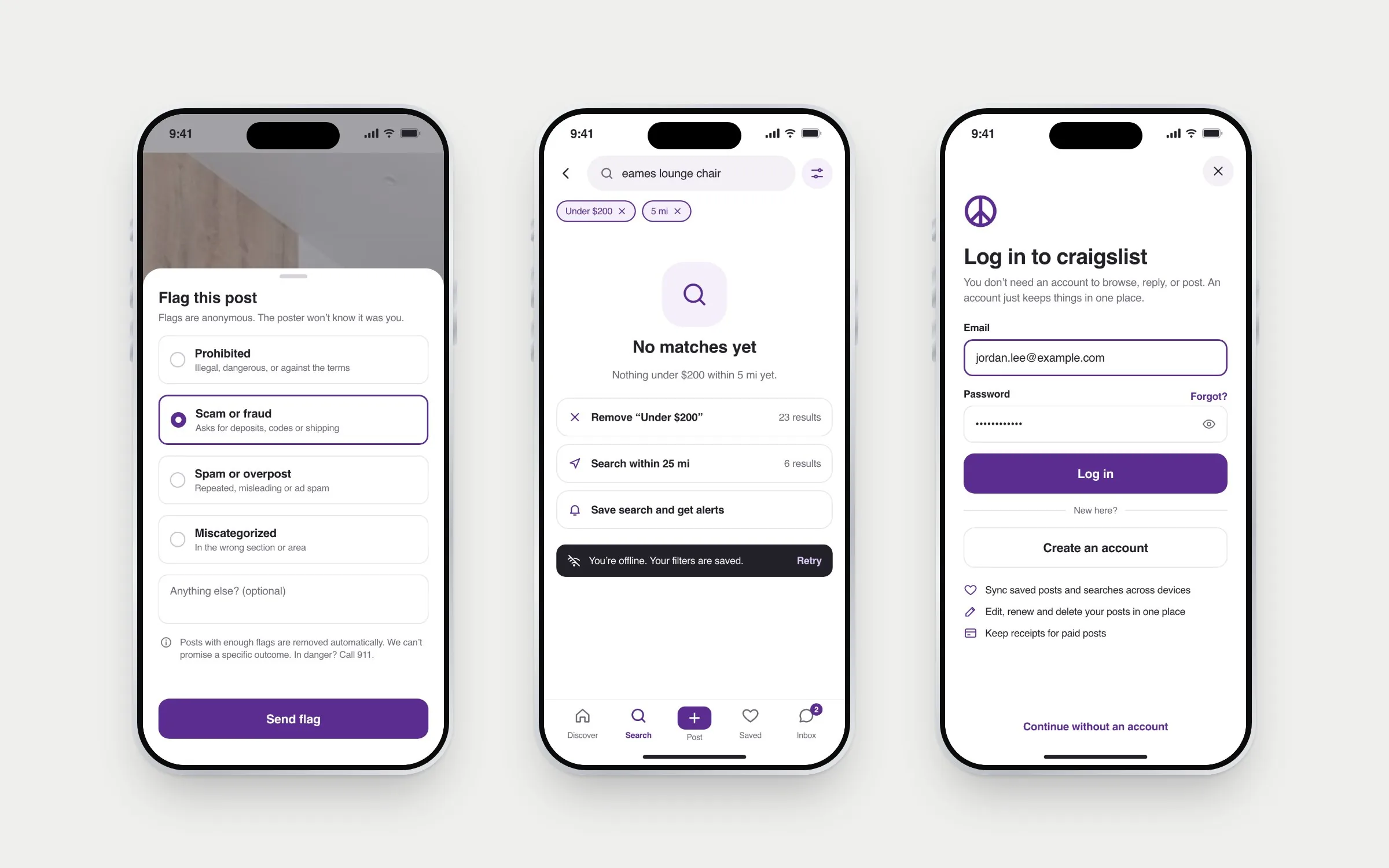
Three iPhones: the flag this post sheet with scam or fraud selected, a no-results state with suggestions and an offline banner, and an optional log-in screen
06

How I’d test it

None of this is validated yet. Each big decision is a bet, so I wrote down what would prove it wrong.

BetHow I’d test itIt’s wrong if
Long-time users aren’t slowed downTimed tasks with 6 regular Craigslist users, today’s site against the prototypeThey take longer to reach a category they already know
Five short steps beat one long formPost the same item both ways; time it and count errorsCompletion drops or time goes up
Checkable facts build more trust than ratingsShow pairs of listings and ask which seller people would meet, and whyPeople ignore the facts or ask for ratings anyway
Move-in costs reduce back-and-forthRenters judge listings with and without the cost tableThey still need to message to decide
07

Reflection

What I learned

  • The look was a symptom. Questioning the brief moved the work from styling pages to helping people decide and stay safe.
  • The best ideas were the ones I dropped. A feed, ratings and chat-first replies would have made it look more modern and work less like Craigslist.
  • Honest trust beats impressive trust. Showing “phone not verified” respects people more than a star score.

What I’d do next

  • Run the four tests above, starting with long-time users, since they have the most to lose.
  • Talk to sellers and landlords, not only buyers and renters. I designed mostly from the buyer’s side.
  • Cut what doesn’t earn its place. If the inbox or tracker doesn’t beat today’s tools, they go.

Craigslist doesn’t need to become something else. It needs to be as easy to use as it is useful.