AI can design a thousand interfaces. Who decides which one is right?
As generating interfaces becomes easier, product judgment becomes more valuable.
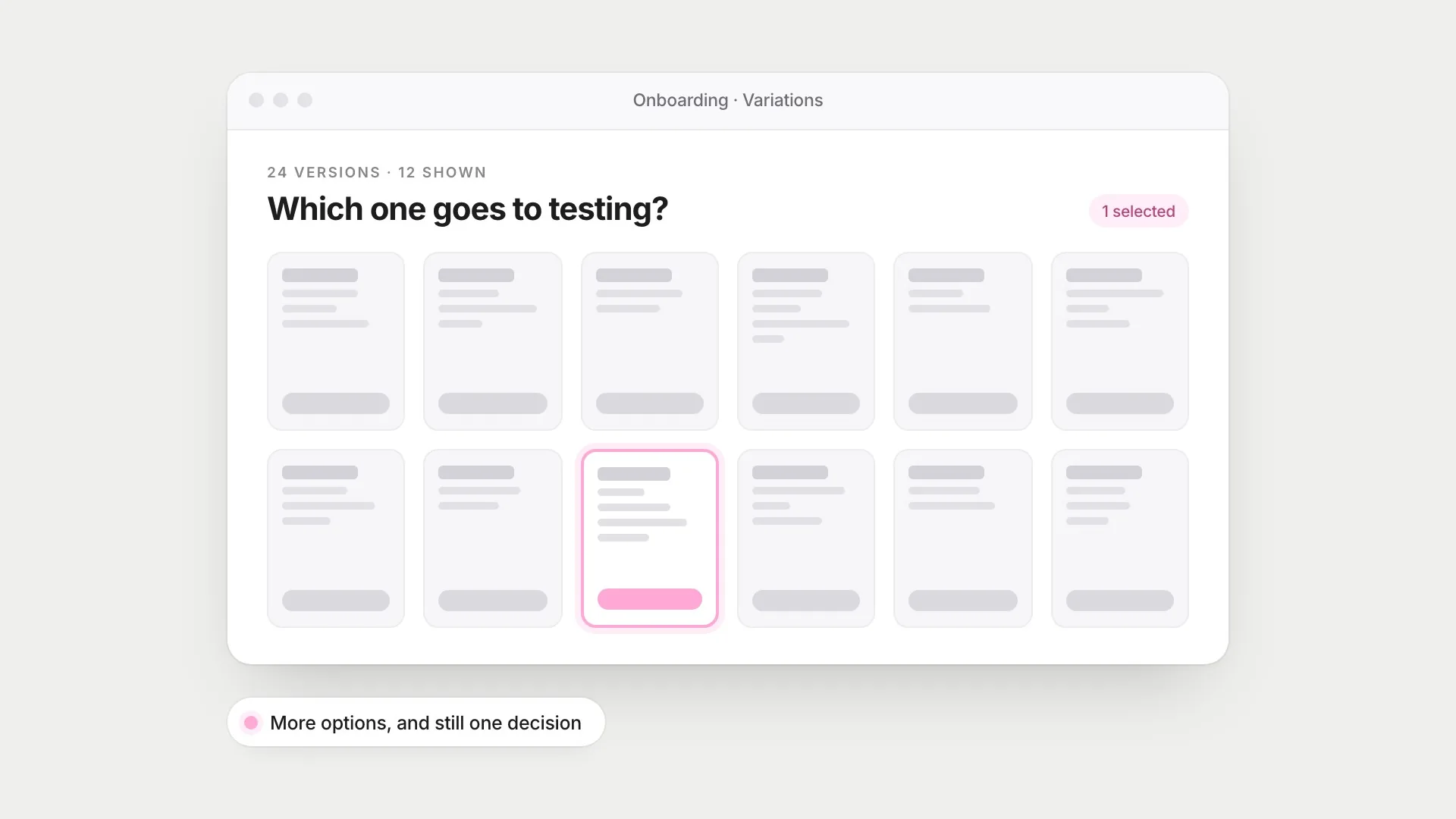
Not long ago, making a new version of a screen took an afternoon. Now it can take less than a minute. Describe an onboarding flow and you can get twenty versions of it, each one tidy, consistent and plausible. Ask for working code and you can click through it.
That changes the economics of design execution. It doesn’t change the hardest part of the job, which was never drawing the screen. It was deciding which screen should exist, for whom, and how you’d know it works. When making options becomes almost free, choosing between them becomes the expensive part.
More options can make deciding harder
There’s a famous study about jam. Sheena Iyengar and Mark Lepper set up a tasting table in a grocery store, sometimes with 6 jams and sometimes with 24. More people stopped at the big display, but far fewer bought anything. It became the classic example of choice overload.
The story turned out to be more complicated. When Benjamin Scheibehenne and colleagues combined 50 experiments on choice overload, the average effect was close to zero. More options sometimes hurt, sometimes helped, and often made no difference. What mattered was the situation: overload was more likely when options were hard to compare and people didn’t have clear preferences going in.
That describes a folder of generated screens almost exactly. Twenty-four onboarding flows that all look professional are hard to compare, and if you haven’t decided what “better” means before you start, you’ll fall back on the one that looks nicest. Looking nice is the one thing every option already does well.
There’s a second trap. David Jansson and Steven Smith showed design engineers an example solution before asking them to design their own, and the engineers copied its features, including ones the brief told them to avoid. They called it design fixation. Generated variations share the same training data and the same common patterns, so twenty-four versions can easily be twenty-four takes on the same idea.
Generating more isn’t the problem, though. Steven Dow and colleagues found that designers who made several prototypes in parallel and got feedback on all of them produced better results, and more varied ones, than designers who refined one prototype at a time. Variation helps when you deliberately compare the options against something. Without that, it’s just volume.
Where generation genuinely helps
I don’t want to undersell this. Cheap generation is useful at specific points in a project:
- Mapping the space early. Seeing a wide range of structures before committing to one is exactly what parallel prototyping recommends.
- Building to answer one question. A throwaway prototype that tests a single assumption is worth making when it costs minutes instead of days.
- Covering the unglamorous states. Empty, loading, error, very long names, a second language. These are where products break, and they’re tedious to draw by hand.
- Working in real code. A coded prototype shows timing, real content and real behaviour, which a static mockup can’t.
That last one has changed how I work the most. I designed Parallax, an AI app that questions your opinions, and I built its front end myself, so I could test the real conversation rather than a picture of one. That mattered for an AI product. In my interviews, long chatbot replies had lost 4 of 7 people, including the participant using a screen reader and the one using only a phone, so “one short question per turn” became a rule. In a static mockup I would have written every reply myself, at exactly the right length. Only a working prototype could show whether real replies, to real opinions, kept to the rule.
Plausible isn’t the same as right
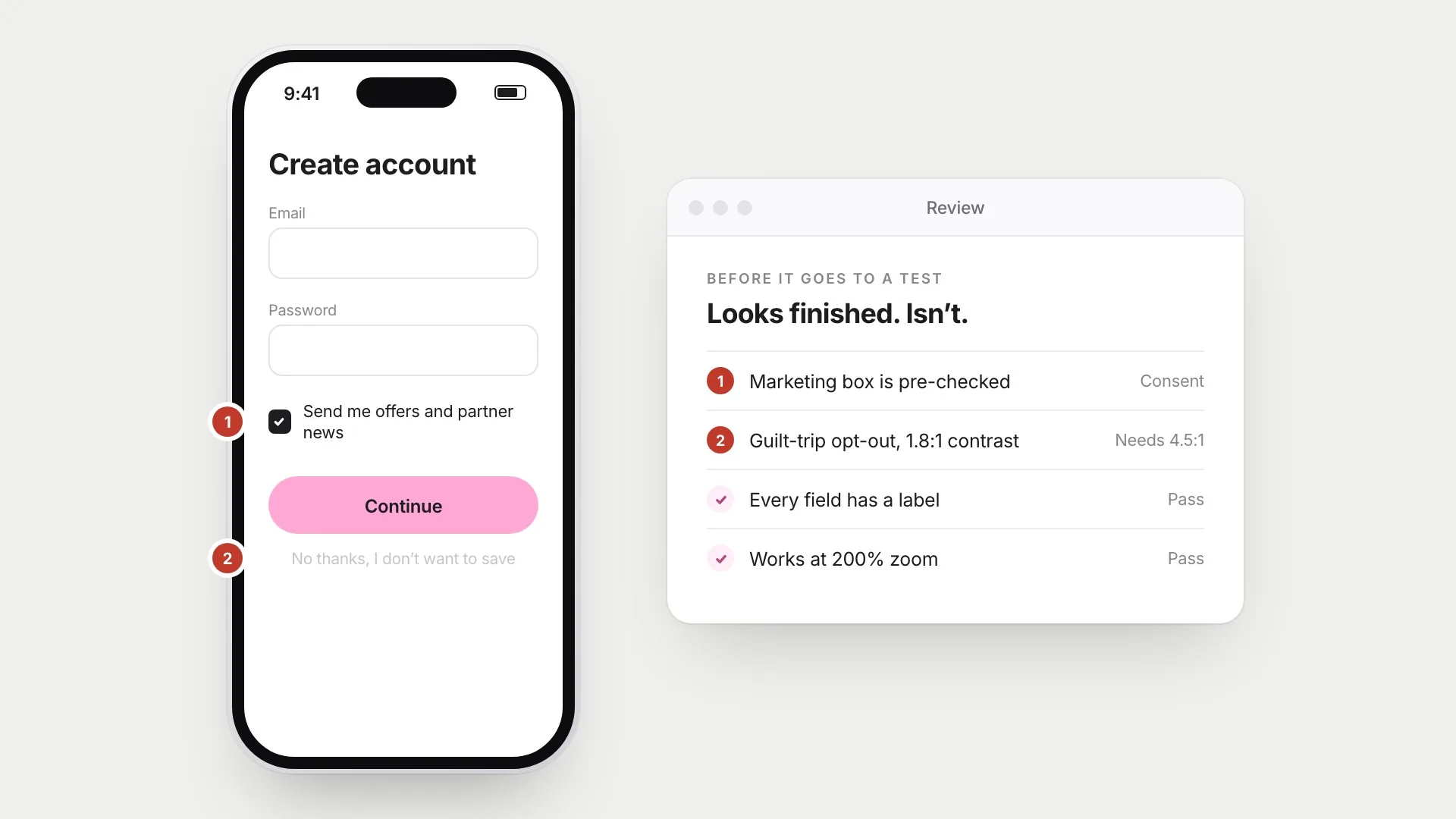
The hard thing about generated interfaces is that they look finished. That makes their problems easy to miss.
A model trained on the web learns the web’s habits, including the bad ones. WebAIM’s annual scan of the top million home pages found detectable accessibility failures on 95.9% of them in 2024, with low-contrast text the most common problem. When Arunesh Mathur and colleagues crawled around 11,000 shopping sites, they found 1,818 instances of dark patterns: fake urgency, hidden costs, pre-checked boxes and opt-out links written to make you feel guilty. Those patterns are common, so a system that reproduces common patterns will reproduce them fluently.
So before anything generated goes in front of a participant, I check it against a list that has nothing to do with how it looks:
- Access. Contrast, labels on every field, keyboard order, screen reader announcements, and whether it still works at 200% zoom.
- Consent and honesty. No pre-checked boxes for things people didn’t ask for, no guilt-trip opt-outs, and cancel as easy to find as sign up.
- Who it assumes. Placeholder names, photos and form fields quietly decide who the “default” user is. A name field that rejects an apostrophe or a script it doesn’t recognise is a design decision too.
- Whether it answers the brief. The most common problem is the simplest: a polished screen that solves a slightly different problem from the one the research found.
Evidence decides, not taste
Even after all that, I can’t tell which version is right by looking at it, and I don’t think anyone reliably can. Ron Kohavi, who ran experimentation at Microsoft, reported that only about a third of the ideas they tested improved the metric they were designed to improve. Those were ideas experienced teams believed in enough to build.
That’s why my process always ends in a test with real people, even a small one. Jakob Nielsen and Thomas Landauer showed that a handful of participants per round finds most of the major usability problems, as long as you fix what you find and test again. Two examples from my own projects show why this matters more than which version I liked:
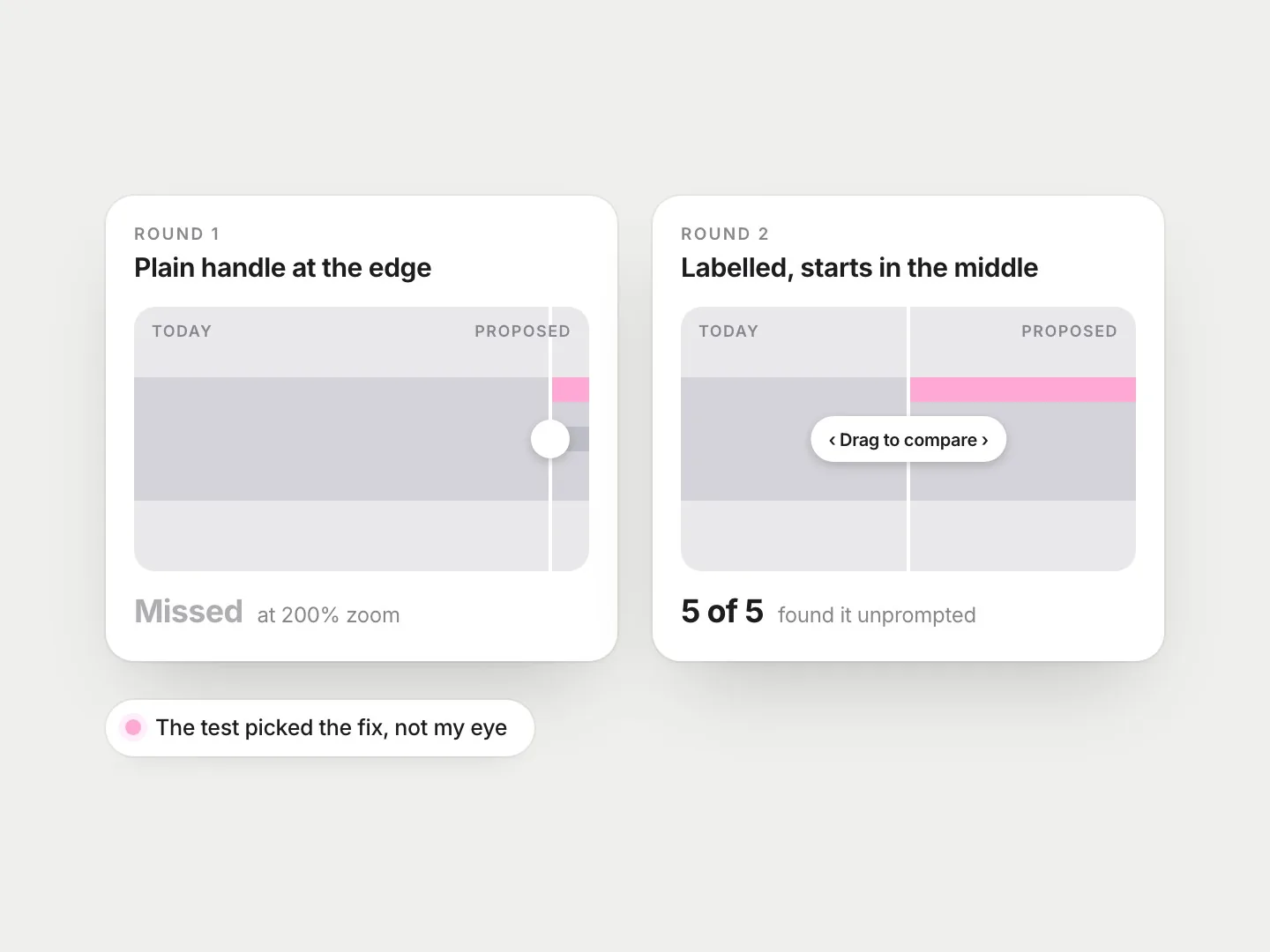
Forma. Forma lets residents compare a street today with a proposed redesign by dragging a handle across the picture. In the first round, the participant using 200% zoom didn’t notice the handle at all. The fix wasn’t a nicer handle. It was a labelled one that starts in the middle of the picture, plus a “Compare in words” button for anyone who doesn’t want to drag. In a second round, 5 of 5 people found it without being prompted.
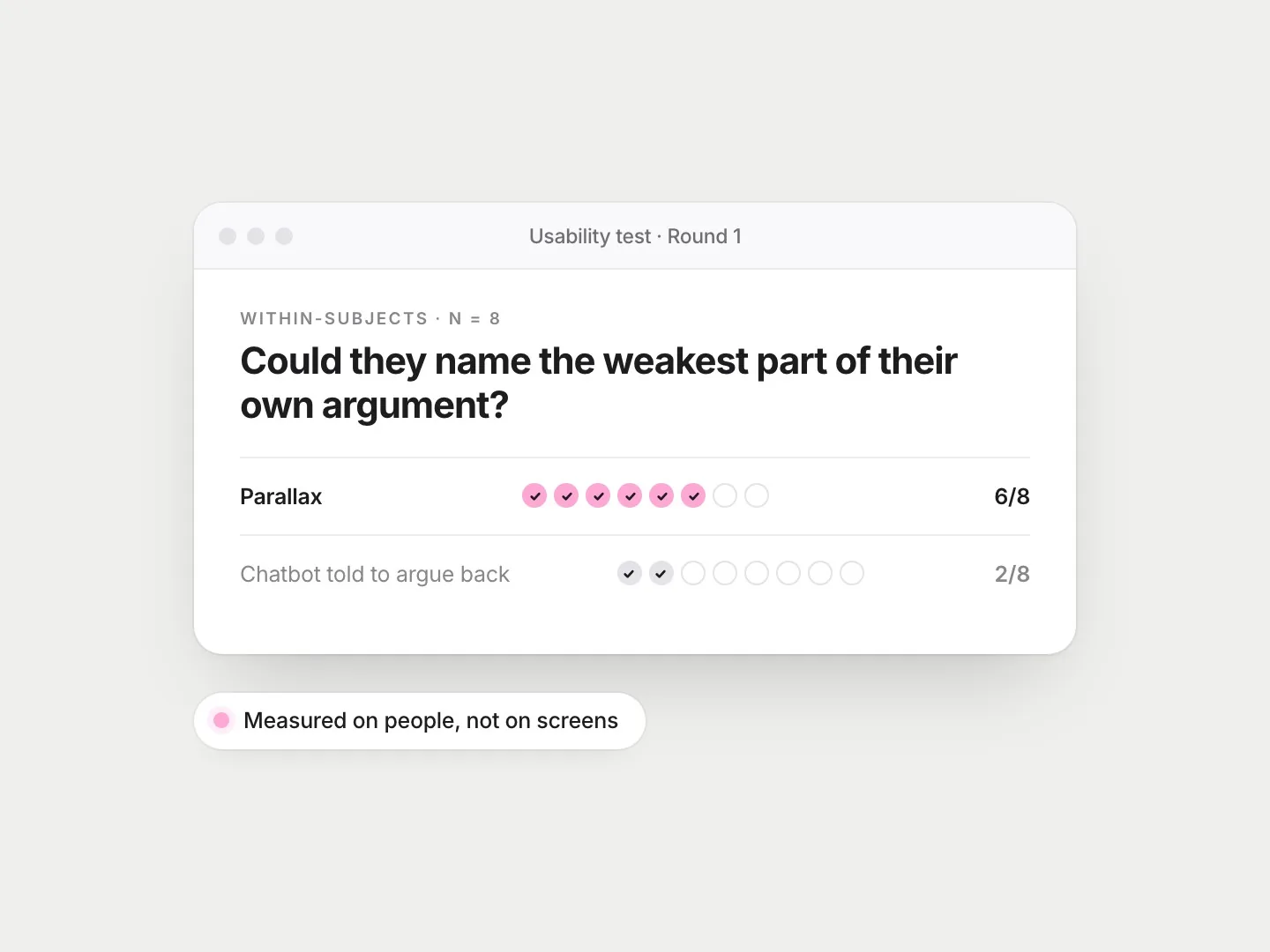
Parallax. I tested Parallax against a general chatbot told to argue with people. With Parallax, 6 of 8 people could name the weakest part of their own argument, against 2 of 8 with the chatbot. Before the test, I’d planned to open with the strongest counterargument. A debate coach I interviewed told me never to do that, and to make people say what they mean first. The counterargument moved to the fourth stage, and that structure is what the test measured.
What changes for designers
If making is cheap, I think the valuable skills move to both ends of the process. At the start: framing the problem, and writing down what “better” means before generating anything. At the end: reviewing critically, testing with people, and being willing to throw away something that looks great.
The brief becomes a design artifact in its own right. What you give a generator is roughly what you get back, so the research findings, constraints, accessibility rules and tone of voice need to be in it, written as clearly as you’d write them for a new teammate. A vague prompt gives you the average of the web. A good brief gives you options worth comparing.
This is roughly the loop I follow now:
- Write the question and the criteria first, before any screens exist.
- Go wide on purpose, including directions I don’t expect to choose.
- Cut to two or three, using the criteria rather than taste.
- Check them for access, consent and assumptions about who the user is.
- Build the survivors in working code and test them with five to eight people.
- Write down what I rejected and why, so the decision can be explained later.
The last step matters more than it looks. When options were expensive, there were only a few to explain. Now that there can be dozens, the ability to say “we chose this one because of this evidence” is what separates a design decision from a pick.
Anyone can generate the options now. The job is knowing which one people can actually use, and being able to show why.
References
8
- Dow, S. P., Glassco, A., Kass, J., Schwarz, M., Schwartz, D. L. & Klemmer, S. R. (2010). Parallel prototyping leads to better design results, more divergence, and increased self-efficacy. ACM Transactions on Computer-Human Interaction, 17(4), 1–24. doi.org/10.1145/1879831.1879836
- Iyengar, S. S. & Lepper, M. R. (2000). When choice is demotivating: Can one desire too much of a good thing? Journal of Personality and Social Psychology, 79(6), 995–1006. doi.org/10.1037/0022-3514.79.6.995
- Jansson, D. G. & Smith, S. M. (1991). Design fixation. Design Studies, 12(1), 3–11. doi.org/10.1016/0142-694X(91)90003-F
- Kohavi, R., Tang, D. & Xu, Y. (2020). Trustworthy online controlled experiments: A practical guide to A/B testing. Cambridge University Press. doi.org/10.1017/9781108653985
- Mathur, A., Acar, G., Friedman, M. J., Lucherini, E., Mayer, J., Chetty, M. & Narayanan, A. (2019). Dark patterns at scale: Findings from a crawl of 11K shopping websites. Proceedings of the ACM on Human-Computer Interaction, 3(CSCW), 1–32. doi.org/10.1145/3359183
- Nielsen, J. & Landauer, T. K. (1993). A mathematical model of the finding of usability problems. Proceedings of the INTERACT ’93 and CHI ’93 Conference on Human Factors in Computing Systems, 206–213. doi.org/10.1145/169059.169166
- Scheibehenne, B., Greifeneder, R. & Todd, P. M. (2010). Can there ever be too many options? A meta-analytic review of choice overload. Journal of Consumer Research, 37(3), 409–425. doi.org/10.1086/651235
- WebAIM. (2024). The WebAIM Million: The 2024 report on the accessibility of the top 1,000,000 home pages. webaim.org/projects/million/2024